
| view 👀:171 |
🙍 oneddl |
redaktor: Baturi | Rating👍:
Deltares Delft3D FM Suite 2026.01 Win x64 English
Free Download Deltares Delft3D FM Suite 2026.01 | 986.0 mb
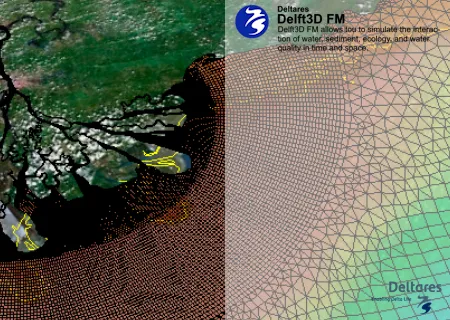
Deltares has released Delft3D Flexible Mesh Suite (Delft3D FM) 2026.01 is powerful modelling suite focusing primarily on coastal, estuarine and river environments.
Delft3D Flexible Mesh
Interface
D-Flow FM Fixes and improvements to the automatic conversion data in the old format external forcing file to the new file formats.
- Quantities that are not supported by the GUI are also converted to the new file structure.
- Extended the conversion by supporting more quantities and types of data
User Interface
- D-Flow FM Constant boundary forcings are now supported during import/export and editing in the UI.
- D-Flow FM Reading and writing of depth-averaged data for sources and sinks (from .pli file) is now supported (note: not editable/visible in the UI).
- D-Flow FM Incorrect visualization of the tide defined by astronomic components has been fixed.
- D-Real Time Control Several bug fixes were made:
. Restart input was not imported during a DIMR import.
. Timeseries were shortened to fit the model run period, instead of exporting the full timeseries.
. A model could not be imported if the 'rtcShapesConfig.xml' file was missing or if a rule or condition was missing in the input file.
- D-Waves Add support for SWAN 41.51.3
Comp. Core
D-Flow FM: Upgrade to New External Forcings Format
- Most external forcings - such as time-dependent open boundaries and wind - have been upgraded from the old format (TIM, CMP files) to the new BC file format. This affects D-Flow Flexible Mesh model inputs and initial conditions (see Appendices C.4 and D in the D-Flow FM user manual). A few quantities (e.g., WAQ parameters, general structures) are presently only available in the old format.
- The model input of existing models can be converted to the new format via the GUI or using the Python converter tool
- Important: Support for the legacy extForceFile format will be removed in release 2027.01. Please update all boundary, meteorological, initial and parameter files to the new external forcings format using Delft3D FM 2026.01 or 2026.02
- D-Flow FM: The default value of the keyword windhuorzwsbased has changed from 1 to 0 for 2D models (note: for 3D models, the default was already 0).
- D-Flow FM: The default value of the keyword barocponbnd has changed from 0 to 1.
- D-Flow FM: The default value of the keyword keepstbndonoutflow has changed from 0 to 1.
- D-Morphology: Users will have more control on the morphological outputs. More output keywords available, clearer explanation on the output keywords in the manual, and fixed previously non-functional output keywords.
- D-Waves: Switch from "SWAN 41.31A" to "SWAN 41.51"
- D-Waves: Some defaults have been changed, see detailed change-list.
- D-Water Quality: for both 1D2D/2D3D, Radiation averaging functions has been updated, which make the data flow clearer (see Appendix 1)
Container
- Created container knowledge base:
- Reduced the size of the apptainer container image by removing superfluous libriaries.
User Interface
- General: The MDU reader does not longer support multiple characters for comments in the same file. We recommend to use hashtag to seperate a comment from input. Other characters used for comments will result in a model fail during import or load in the GUI. Please remove those from the MDU file.
- D-Flow FM: Old external forcing file quantities, except for the water quality special features, are migrated to the quantities in the new ex- ternal forcing file, quantities in structure file, or initial and parameter file quantities.
- D-Flow FM: The GUI can read both old external forcing file quantities as the quantities in new external forcing file, structure file and initial and parameter file, however old external forcing file quantities will be written in the new format during export or save.
- D-Flow FM: Unsupported external forcing quanties (not implemented in the GUI) will be preserved during import/load and export/save. This means that the quantities are loaded, retained in memory, and written out in the new format during saving or exporting.
- D-Flow FM: The default of the class map interval is set to 0.
- D-Waves: The communication file between D-Flow FM and D-Waves (*com.nc) is also found when the directory structure deviates from the default folder structure.
Comp. Core
- D-Flow FM: The new external forcings file can be used for all features of the old external forcings file, except for water quality special features. In the 2025.02 release, both the new and old external forcings files can be used. However, starting with the 2026.01 release (November 2025), the old external forcings files will be deprecated, and only the new external forcings file will be supported.
- D-Flow FM: We have transitioned from the Ifort compiler to the IFX compiler. If you compile your code yourself, you will need to update to the new compiler.
- D-Flow FM: The writing of numlimdt.xyz has been re-enabled.
- D-Flow FM: On a Linux machine, store the partitioned network file in the same folder as the mdu file. Create a folder for the computation, place the mdu file and other files there, and use ln -s/p/<common place>/xxxx_net.nc to create a symbolic link. The mdu file will reference the network file without a path. During partitioning, Delft3D-FM will place the partitioned network files in the local folder. When copying a folder with a symbolic link, use cp –preserve=links to retain the link.
- D-Flow FM: The default value of allowedFlowDir is now consistent across all structure types.
- D-Flow FM: We have resolved the bug where no water flowed through the YZ bridge with negative m AD.
- D-Flow FM: SWAN output can now be coupled offline to D-Flow FM.
- D-Flow FM: Spatial and time-varying air density has been implemented.
- D-Flow FM: Thin dams have been added to the cache file.
D-Water Quality: OpenPLCT has been discontinued. The process library configuration tool (PLCT) used to have a so-called "developer mode," which allowed an experienced user to define their own processes. This option, informally called OpenPLCT, still exists, but it is no longer supported via the graphical user interface. The reasons for this discontinuation are:
- It took a large number of GUI actions to set up a new process with its process parameters and other input.
- The user interface turned out to be unreliable; at times, it would simply terminate, resulting in the loss of all work. Despite intense efforts, we have been unable to identify the cause.
- The alternative to the GUI has been around for a long time and offers sufficient functionality to be the preferred and now only way. The manual has been adapted for the new situation.
- Another drawback of the old method via the user interface is that you would add the new process configuration directly to the process definition file (proc_def.dat/.def) without the possibility to inspect it or transfer the changes to a new version of the standard process definition file. The OpenPLCT feature is now available by means of: A set of auxiliary programs that convert the so-called "proces.asc" file to an informal database, maintained in the form of CSV files, or these CSV files to (proc_def.dat/.def) file and a corresponding proces.asc file. As this "proces.asc" file is a plain text file whose contents follow a certain convention, adding or changing process configurations can be done with any text editor. The one thing that is no longer supported is creating a template for the process routine and providing a build script (in the form of a Makefile or a Visual Studio solution). This may be reinstated at some point. The programming methodology, however, is the same as before; just a bit more manual work is required. The procedure is explained in detail in chapter 3 and appendix A of the user manual for the open processes library.
D-Water Quality: Increase tests, especially on the following items:
- Integration scheme 11 and 22
- DEBGRZ in combination with PROTIST
- PLCT (test plan and the validity of its functioning)
- Integration tests
D-Water Quality: Removal of obsolete functionality and duplicated processes:
- Chlorinity where a translation from Salinity is possible
- ProcessFluxIntegration (a deprecated and non-functional keyword in D-Flow FM)
![_24e79c80017ddf...]()
The Delft3D Flexible Mesh Suite (Delft3D FM) is the successor of the Delft3D 4 Suite. Like Delft3D 4, the Delft3D FM Suite can simulate storm surges, hurricanes, tsunamis, detailed flows and water levels, waves, sediment transport and morphology, water quality and ecology, and is capable of handling the interactions between these processes. The suite is designed for use by domain experts and non-experts alike, which may range from consultants and engineers or contractors, to regulators and government officials, all of whom are active in one or more of the stages of the design, implementation and management cycle.
Wave Model How to Nest a Outer Domain in Delft3D FM
This Video describes how to do the nesting of different grid in Delft3D Fm and also how to run it in background with run.bat file.
Deltares is an independent knowledge institute for applied research in the field of water and subsurface. We work throughout the world and we are guided by the major societal issues, for which Deltares' knowledge is indispensable. We believe in the power of in-depth knowledge, innovative solutions, and software to ensure the world's delta regions remain habitable.
Owner: Deltares
Product Name: Delft3D FM Suite
Version: 2026.01 2D3D-HHMWQ (Hydrodynamics, Morphology, Water Quality)
Supported Architectures: x64
Website Home Page :
Languages Supported: english
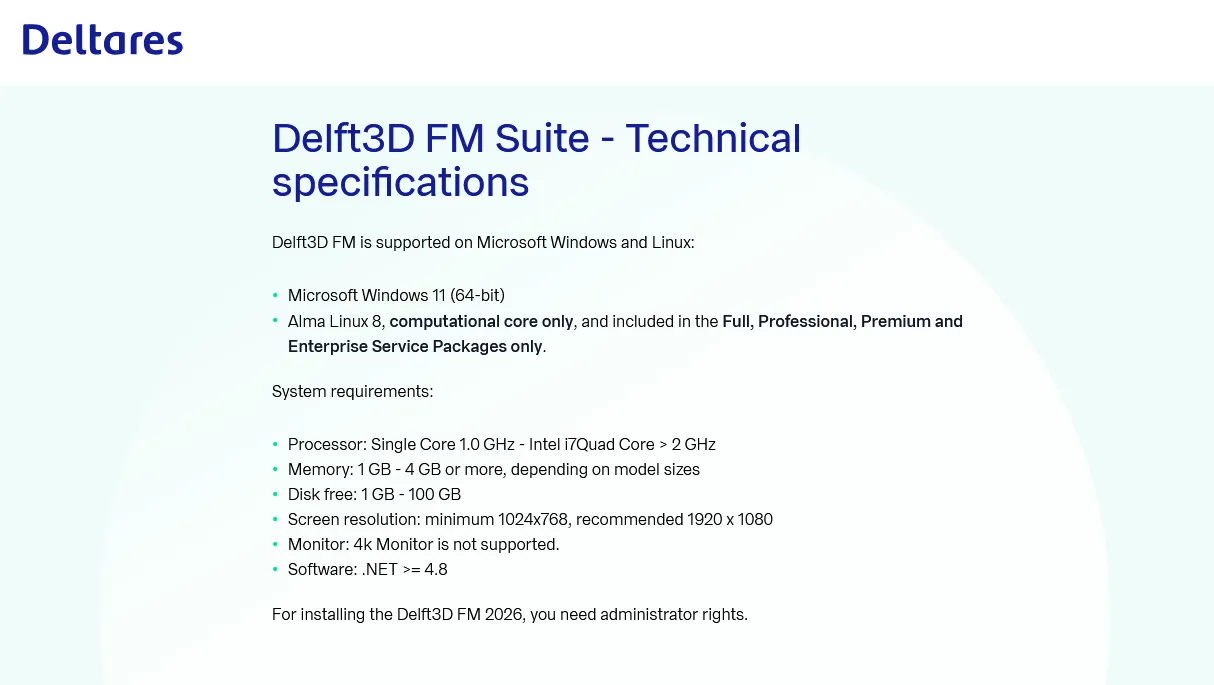
System Requirements: Windows *
Size: 986.0 mb
![fb2d55a265a2c59...]()
Interface
D-Flow FM Fixes and improvements to the automatic conversion data in the old format external forcing file to the new file formats.
- Quantities that are not supported by the GUI are also converted to the new file structure.
- Extended the conversion by supporting more quantities and types of data
User Interface
- D-Flow FM Constant boundary forcings are now supported during import/export and editing in the UI.
- D-Flow FM Reading and writing of depth-averaged data for sources and sinks (from .pli file) is now supported (note: not editable/visible in the UI).
- D-Flow FM Incorrect visualization of the tide defined by astronomic components has been fixed.
- D-Real Time Control Several bug fixes were made:
. Restart input was not imported during a DIMR import.
. Timeseries were shortened to fit the model run period, instead of exporting the full timeseries.
. A model could not be imported if the 'rtcShapesConfig.xml' file was missing or if a rule or condition was missing in the input file.
- D-Waves Add support for SWAN 41.51.3
Comp. Core
D-Flow FM: Upgrade to New External Forcings Format
- Most external forcings - such as time-dependent open boundaries and wind - have been upgraded from the old format (TIM, CMP files) to the new BC file format. This affects D-Flow Flexible Mesh model inputs and initial conditions (see Appendices C.4 and D in the D-Flow FM user manual). A few quantities (e.g., WAQ parameters, general structures) are presently only available in the old format.
- The model input of existing models can be converted to the new format via the GUI or using the Python converter tool
https://deltares.github.io/HYDROLIB-core/main/tutorials/extforce-convert/external_forcing_conversion/
- Important: Support for the legacy extForceFile format will be removed in release 2027.01. Please update all boundary, meteorological, initial and parameter files to the new external forcings format using Delft3D FM 2026.01 or 2026.02
- D-Flow FM: The default value of the keyword windhuorzwsbased has changed from 1 to 0 for 2D models (note: for 3D models, the default was already 0).
- D-Flow FM: The default value of the keyword barocponbnd has changed from 0 to 1.
- D-Flow FM: The default value of the keyword keepstbndonoutflow has changed from 0 to 1.
- D-Morphology: Users will have more control on the morphological outputs. More output keywords available, clearer explanation on the output keywords in the manual, and fixed previously non-functional output keywords.
- D-Waves: Switch from "SWAN 41.31A" to "SWAN 41.51"
- D-Waves: Some defaults have been changed, see detailed change-list.
- D-Water Quality: for both 1D2D/2D3D, Radiation averaging functions has been updated, which make the data flow clearer (see Appendix 1)
Container
- Created container knowledge base:
https://publicwiki.deltares.nl/spaces/Delft3DContainers/pages/256475160/Delft3D+Containers+Home
- Reduced the size of the apptainer container image by removing superfluous libriaries.
User Interface
- General: The MDU reader does not longer support multiple characters for comments in the same file. We recommend to use hashtag to seperate a comment from input. Other characters used for comments will result in a model fail during import or load in the GUI. Please remove those from the MDU file.
- D-Flow FM: Old external forcing file quantities, except for the water quality special features, are migrated to the quantities in the new ex- ternal forcing file, quantities in structure file, or initial and parameter file quantities.
- D-Flow FM: The GUI can read both old external forcing file quantities as the quantities in new external forcing file, structure file and initial and parameter file, however old external forcing file quantities will be written in the new format during export or save.
- D-Flow FM: Unsupported external forcing quanties (not implemented in the GUI) will be preserved during import/load and export/save. This means that the quantities are loaded, retained in memory, and written out in the new format during saving or exporting.
- D-Flow FM: The default of the class map interval is set to 0.
- D-Waves: The communication file between D-Flow FM and D-Waves (*com.nc) is also found when the directory structure deviates from the default folder structure.
Comp. Core
- D-Flow FM: The new external forcings file can be used for all features of the old external forcings file, except for water quality special features. In the 2025.02 release, both the new and old external forcings files can be used. However, starting with the 2026.01 release (November 2025), the old external forcings files will be deprecated, and only the new external forcings file will be supported.
- D-Flow FM: We have transitioned from the Ifort compiler to the IFX compiler. If you compile your code yourself, you will need to update to the new compiler.
- D-Flow FM: The writing of numlimdt.xyz has been re-enabled.
- D-Flow FM: On a Linux machine, store the partitioned network file in the same folder as the mdu file. Create a folder for the computation, place the mdu file and other files there, and use ln -s/p/<common place>/xxxx_net.nc to create a symbolic link. The mdu file will reference the network file without a path. During partitioning, Delft3D-FM will place the partitioned network files in the local folder. When copying a folder with a symbolic link, use cp –preserve=links to retain the link.
- D-Flow FM: The default value of allowedFlowDir is now consistent across all structure types.
- D-Flow FM: We have resolved the bug where no water flowed through the YZ bridge with negative m AD.
- D-Flow FM: SWAN output can now be coupled offline to D-Flow FM.
- D-Flow FM: Spatial and time-varying air density has been implemented.
- D-Flow FM: Thin dams have been added to the cache file.
D-Water Quality: OpenPLCT has been discontinued. The process library configuration tool (PLCT) used to have a so-called "developer mode," which allowed an experienced user to define their own processes. This option, informally called OpenPLCT, still exists, but it is no longer supported via the graphical user interface. The reasons for this discontinuation are:
- It took a large number of GUI actions to set up a new process with its process parameters and other input.
- The user interface turned out to be unreliable; at times, it would simply terminate, resulting in the loss of all work. Despite intense efforts, we have been unable to identify the cause.
- The alternative to the GUI has been around for a long time and offers sufficient functionality to be the preferred and now only way. The manual has been adapted for the new situation.
- Another drawback of the old method via the user interface is that you would add the new process configuration directly to the process definition file (proc_def.dat/.def) without the possibility to inspect it or transfer the changes to a new version of the standard process definition file. The OpenPLCT feature is now available by means of: A set of auxiliary programs that convert the so-called "proces.asc" file to an informal database, maintained in the form of CSV files, or these CSV files to (proc_def.dat/.def) file and a corresponding proces.asc file. As this "proces.asc" file is a plain text file whose contents follow a certain convention, adding or changing process configurations can be done with any text editor. The one thing that is no longer supported is creating a template for the process routine and providing a build script (in the form of a Makefile or a Visual Studio solution). This may be reinstated at some point. The programming methodology, however, is the same as before; just a bit more manual work is required. The procedure is explained in detail in chapter 3 and appendix A of the user manual for the open processes library.
D-Water Quality: Increase tests, especially on the following items:
- Integration scheme 11 and 22
- DEBGRZ in combination with PROTIST
- PLCT (test plan and the validity of its functioning)
- Integration tests
D-Water Quality: Removal of obsolete functionality and duplicated processes:
- Chlorinity where a translation from Salinity is possible
- ProcessFluxIntegration (a deprecated and non-functional keyword in D-Flow FM)

The Delft3D Flexible Mesh Suite (Delft3D FM) is the successor of the Delft3D 4 Suite. Like Delft3D 4, the Delft3D FM Suite can simulate storm surges, hurricanes, tsunamis, detailed flows and water levels, waves, sediment transport and morphology, water quality and ecology, and is capable of handling the interactions between these processes. The suite is designed for use by domain experts and non-experts alike, which may range from consultants and engineers or contractors, to regulators and government officials, all of whom are active in one or more of the stages of the design, implementation and management cycle.
Wave Model How to Nest a Outer Domain in Delft3D FM
https://www.youtube.com/embed/9gReIMjikz4
This Video describes how to do the nesting of different grid in Delft3D Fm and also how to run it in background with run.bat file.
Deltares is an independent knowledge institute for applied research in the field of water and subsurface. We work throughout the world and we are guided by the major societal issues, for which Deltares' knowledge is indispensable. We believe in the power of in-depth knowledge, innovative solutions, and software to ensure the world's delta regions remain habitable.
Owner: Deltares
Product Name: Delft3D FM Suite
Version: 2026.01 2D3D-HHMWQ (Hydrodynamics, Morphology, Water Quality)
Supported Architectures: x64
Website Home Page :
https://www.deltares.nl
Languages Supported: english
System Requirements: Windows *
Size: 986.0 mb
Buy Premium From My Links To Get Resumable Support,Max Speed & Support Me
Rapidgator
DeltaresDelft3DFMSuite202601.html
DDownload
ifl1r.Deltares_Delft3D_FM_Suite_2026.01.rar
FreeDL
ifl1r.Deltares_Delft3D_FM_Suite_2026.01.rar.html
FileServe
ifl1r.Deltares_Delft3D_FM_Suite_2026.01.rar.html
Links are Interchangeable - No Password - Single Extraction
⚠️ Dead Link ?
You may submit a re-upload request using the search feature.
All requests are reviewed in accordance with our Content Policy.
Discovering free software download can be a game-changer for users looking to enhance their digital experience without breaking the bank. These platforms offer a vast array of software free download options, covering everything from productivity tools to entertainment applications. The beauty of these sites is not just the price (or lack thereof) but also the variety and accessibility they provide, ensuring that there's something for every type of user.
Comments (0)
Users of Guests are not allowed to comment this publication.