
| view 👀:71 |
🙍 oneddl |
redaktor: Baturi | Rating👍:
Autodesk Solid Angle Arnold 4.8.6 for Maxon Cinema 4D Win x64

Free Download Autodesk Solid Angle Arnold 4.8.6 for Maxon Cinema 4D | 1.5 Gb
Autodesk has released Solid Angle Arnold 4.8.6 for Cinema 4D is a high-performance Monte Carlo ray tracing renderer built for the demands of feature-length animation and visual effects production.
C4DtoA 4.8.6 uses Arnold 7.4.5.0 and is a minor feature release.
Enhancements
- Line shader:
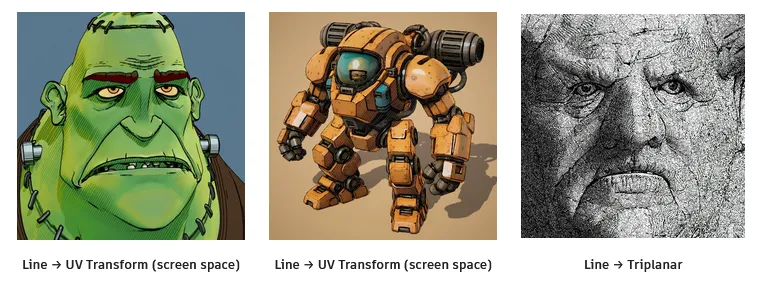
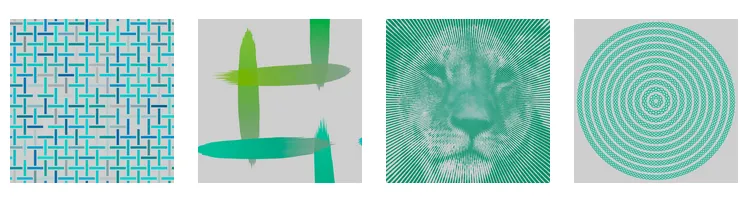
The new line shader renders lines in various styles to create geometric patterns or brush-stroke-like textures when combined with noise and textures. You can generate complex hierarchical patterns by connecting line shaders together. We recommend using the line shader with uv_transform. (ARNOLD-14976)
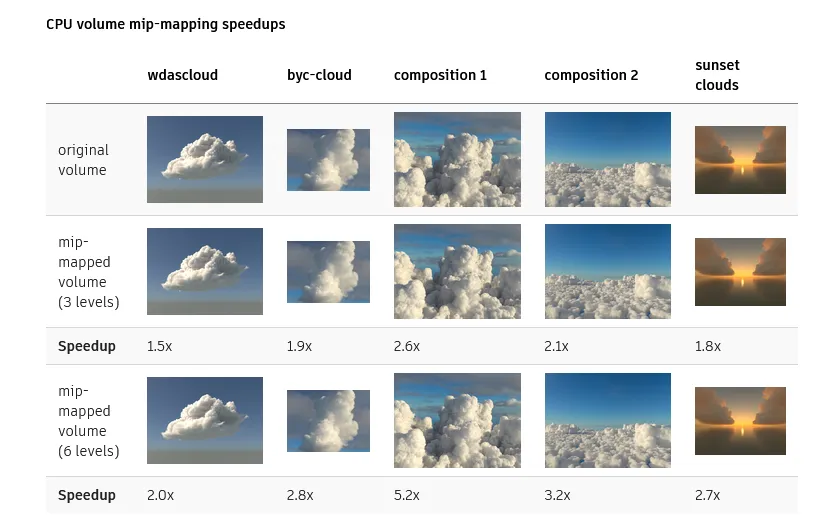
Support for mip-mapped OpenVDB files on CPU: The volume node now accepts OpenVDB files with mip-mapped grids. You can generate volume mip maps with the Arnold API or with kick (see API Changes below). The different mip-map levels are distinguished by _level_N suffixes, where N is the mip-map level. Arnold then automatically chooses the appropriate mip-map level during rendering, which gives substantial speedups in volumes with a lot of scattering (for example, clouds) in exchange for mostly small differences in look. Volumes with more mip-map levels can have larger differences in look. Users can also specify mipmap_bias on a volume node or on its instance (by declaring user data of the same name), which adjusts the automatic mipmap selection by that amount. (ARNOLD-14453, ARNOLD-15056)
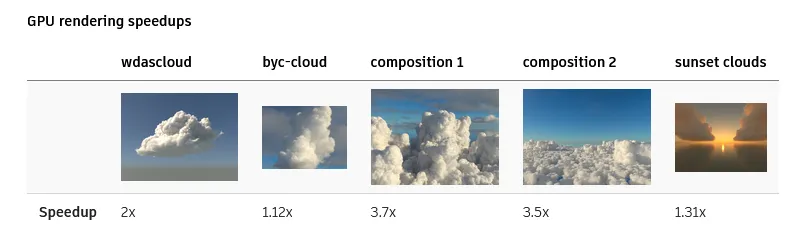
Improved GPU volume rendering performance: GPU rendering of volumes is up to 3.5x faster. (ARNOLD-8936)
Nearest points shader: The new nearest_points shader samples point clouds from OpenVDB points files, or alternatively, the vertices from points, curves, and polymesh nodes. The shader can output the number of points found, average distance, or an average of a custom user-data attribute from the points. (ARNOLD-15550)
pointcloud_search and pointcloud_get OSL support: Support has been added for the pointcloud_search and pointcloud_get OSL built-in functions. To specify a points, curves, or polymesh node, use the node name for the point cloud name. To specify an OpenVDB file, use the format filename:grid for the point cloud name. Note: These functions are not yet available on GPU. (ARNOLD-15550)
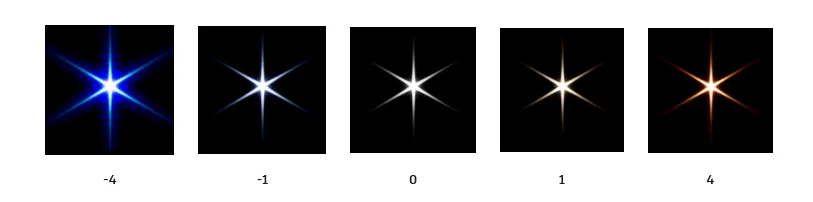
Bloom color dispersion: The imager_lens_effect node has a new aperture_dispersion parameter, which controls the amount of color dispersion when in bloom_mode aperture. Increasing the dispersion value spreads the warmer colors further apart; decreasing it makes the colors progressively cooler. A value of 1 gives realistic dispersion. (ARNOLD-16912)
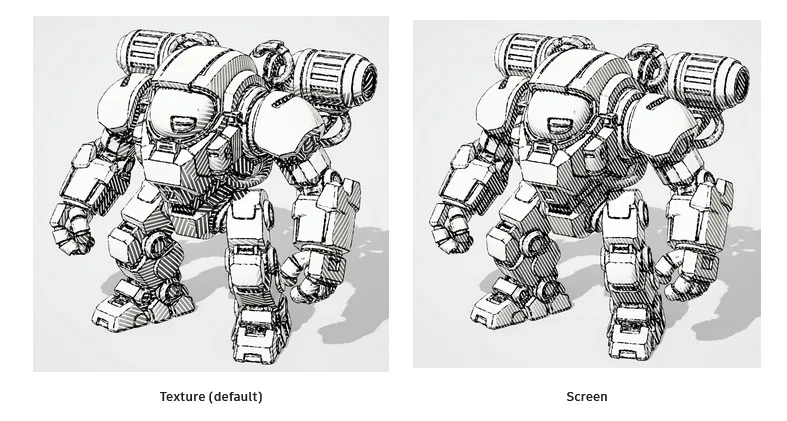
Space option in uv_transform: The uv_transform node now includes a space parameter with texture (default) and screen options. The texture mode applies transforms to standard texture UVs as before, while the screen mode uses screen UV coordinates. (ARNOLD-14976)
Cryptomatte option for instances: A new parameter object_split_instances was added to the cryptomatte shader. It determines whether different instances should have different masks or the same one. (ARNOLD-16997)
Instancer node instances visible in viewport: Instances created by the instancer node can now be displayed in the viewport, making it easier to visualize and work with instanced geometry during scene setup and interactive rendering. (ARNOLD-16778)
Faster handling of interrupted mesh pre-processing: Interrupting mesh pre-processing during IPR (by for instance moving the camera while the scene is loading) no longer causes slowdowns and wasted work. Speedups are expected to increase with core count and mesh size. We have observed savings measured in minutes. (ARNOLD-16978)
Options node included in JSON statistics: The options node parameters are now written to the JSON statistics file, making it easier to understand what render settings were used when you analyze performance data. (ARNOLD-8558)
Consistent unit rounding in Render Report: The Arnold Render Report now rounds values to a consistent unit, improving readability and comparability. Previously, different statistics could be displayed in mixed units (for example, sometimes in milliseconds and others in seconds), which made comparisons difficult. (ARNOLD-17036)
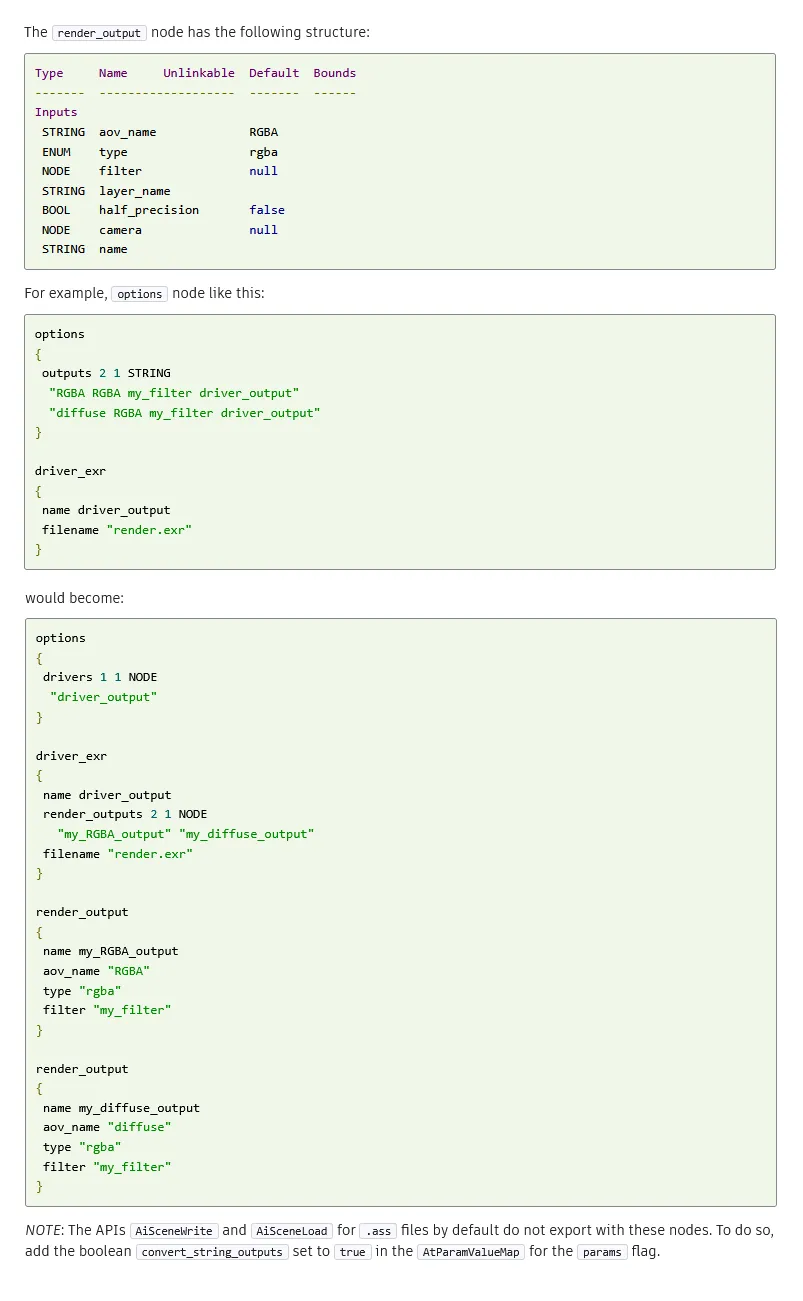
New node-based AOV workflow: A new render_output node replaces the old string-based output statements. The global Arnold options node has a new drivers parameter that links to the driver nodes, and each driver node has a list of render_output nodes. (ARNOLD-5774)
Update CER: The Customer Error Reporting (CER) library is updated to v7.2.4. (ARNOLD-16796)
OpenColorIO 2.5: Arnold now includes OpenColorIO 2.5.0. The upgrade brings support for built-in ACES 2 configs and many other improvements and fixes. See the full release notes for more details. (ARNOLD-17107)
USD Enhancements
Lightweight instancing: Arnold now renders USD instances through a lightweight instancing system that creates fewer Arnold nodes. Instancing is now more memory efficient and time to first pixel is faster, because the scene is quicker to initialize. For example, in the Intel Jungle Ruins scene, the time to first pixel in Houdini Solaris is 85% faster, and the memory usage is 42% lower. usd#2459
USDLux standardization: The Arnold options node has a new usdlux_version parameter that enables USDLux compatibility. Setting usdlux_version to 25.05 activates the current Arnold implementation of the USDLux standard for USD lights. This early development preview includes support for IES orientation and brightness normalization.
Asset resolver: The Autodesk asset resolver is now integrated into the USD procedural. You can now render USD files containing asset-resolving directives, such as tokens and path replacements, using a mapping file and the environment variables described in the Maya documentation.
Volume fieldIndex: Rendering VDB volumes now supports the fieldIndex attribute of the OpenVDBAsset primitive. You can now render a specific grid instead of all grids with a given name. usd#2394
API Changes
Mip-mapped volume generation: You can now generate mip-mapped volumes either with the Arnold API, or with kick. The Arnold API includes a new AiVolumeFileMakeLODs function. kick has a new -makevolumelods command-line flag. Both the API and the kick flag take three arguments: the input file, the output file, and the maximum number of levels to generate. The actual number of levels generated maybe lower than the number requested. (ARNOLD-17114)
Asset API: New API functions allow you to query file dependencies (assets) defined in an Arnold universe (AiUniverseGetAssetIterator), scene file (AiSceneGetAssetIterator), or procedural (AiProceduralGetAssetIterator). (ARNOLD-16891)
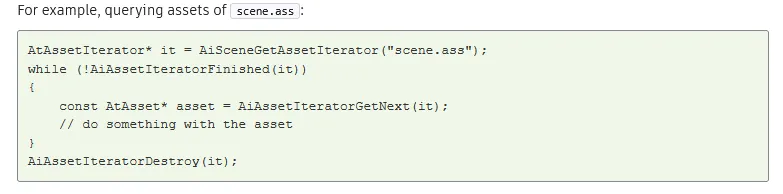
Assets in custom scene formats: Plugin developers can now implement the scene_get_assets method in their scene format plugin to return file dependencies (assets) specific to that format. This method is optional, and if it is not implemented, Arnold loads the scene and queries assets from the generated Arnold universe. (ARNOLD-16891)
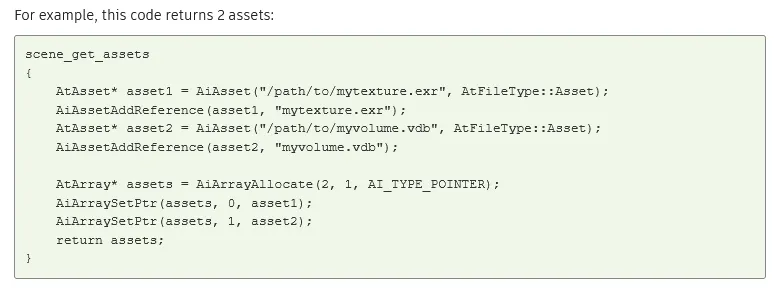
Assets in custom procedurals: Plugin developers can now implement the procedural_get_assets method in their procedural plugin to return file dependencies (assets) defined by that procedural. (ARNOLD-16891)
File type metadаta: A new file_type metadata can be defined on file path parameters to tell how the path needs to be resolved. If not defined, the file type is guessed from the supported extensions of the parameter (extensions metadata) or the extension of the specified file, if any. Available values are custom, asset, texture, procedural, osl, and plugin (see AtFileType enum). (ARNOLD-17289)
Point cloud API: New API functions allow C++ shaders to perform point cloud queries that are very similar to the OSL specification for its pointcloud_search and pointcloud_get functions. The typical usage pattern is to call AiPointCloudSearch to get a list of indices and a count of nearest points, and then call the AiPointCloudGet family of functions to query particular attributes from those points. To specify a points, curves, or polymesh node, use the node name for the point cloud name. To specify an OpenVDB file, use the format filename:grid for the point cloud name. (ARNOLD-15550)
Mip-mapped volume generation: The Arnold API and kick can now generate mip-mapped volumes . The Arnold API includes a new AiVolumeFileMakeLODs function. kick has a new -makevolumelods command-line flag. Both the API and the kick flag take three arguments: the input file, the output file, and the maximum number of levels to generate. (ARNOLD-17114)
Incompatible Changes
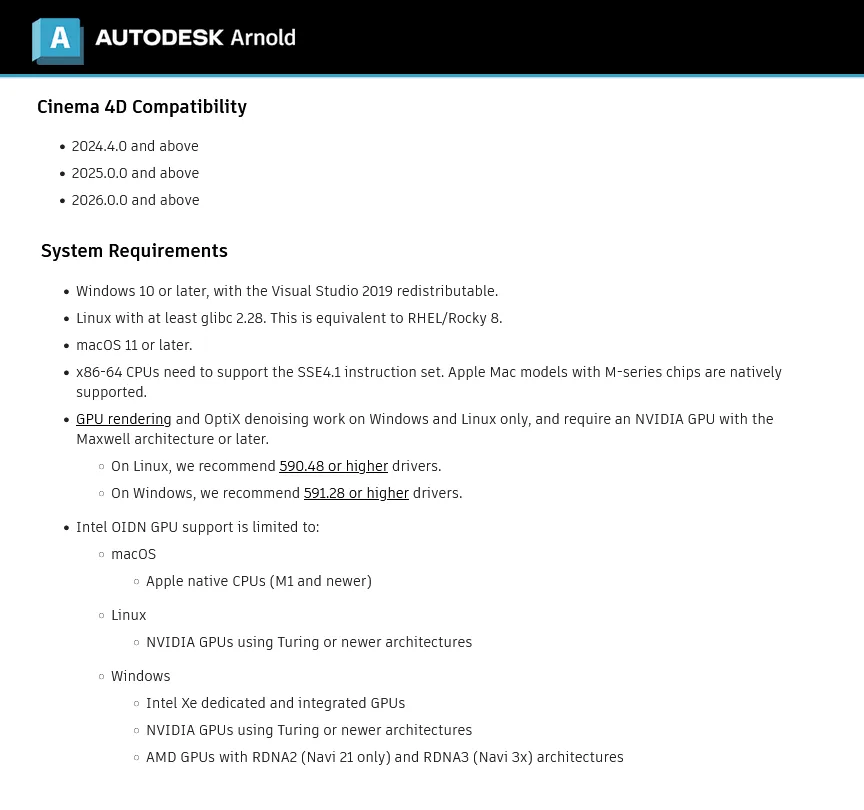
Required NVIDIA driver version must be newer than 582.16/580.126: GPU rendering and OptiX denoising do not work with driver versions 582.16/580.126 (windows/linux) and older, and will log an error and abort the render. Note that you can use New Feature Branch drivers. (ARNOLD-17405)
color_jitter shader now correctly installed as RGB type: The color_jitter shader was mistakenly installed as an RGBA type instead of the correct RGB type, which caused unnecessary complexity when linking it to other shaders in DCC tools. (ARNOLD-17095)
Standard Volume channel references to OpenVDB indexed grids: Channel parameters like standard_volume.density_channel now use grid names without a grid index. (ARNOLD-16753)
For example, density_channel density works with these volume.grids:
- density
- density, density[1]
- density[0], density[1]
- dens*
A standard_volume channel with an index, like density_channel density[1], returns all zeroes. If you need different shaders on different grids, you can have different volume nodes for each grid index, and one standard_volume applied to each volume.
Bug Fixes
- ARNOLD-17291 - Fix out-of-bounds access when sampling mesh lights
- ARNOLD-17349 - Volumes appear more accurate under large camera rotation blur
- ARNOLD-17341 - Random crash while GPU rendering and interactively modifying OSL shaders
- ARNOLD-17350 - Fixed incorrect bounding of lights with nearly co-directional surface normals
- usd#2469 - Authored primvars should not have elementSize set to the array size
- usd#2476 - log_verbosity setting should affect both console and file logs
- usd#2492 - Fix path resolving issue for OCIO config with absolute paths
- usd#2504 - Ensure geom subsets don't get appended to USD in animated exports
Arnold is an unbiased, physically based renderer that makes it easy to create photorealistic images. Its simple interface means that you can get started very quickly, without having to worry about complex settings. Arnold's path tracing algorithm is very efficient, making it possible to render very large scenes with ease. Arnold is also very fast, making it possible to render animations and visual effects in real time. This makes it an ideal renderer for interactive applications such as video games and virtual reality.
How to render Cinema 4D Pyro in Arnold Renderer! (Quickstart)
https://www.youtube.com/embed/8f6wT2wh19Q
Solid Angle S. L. designs and develops application software. The Company offers animation, visual effects, and cartoons. Autodesk has acquired Solid Angle SL, a software company headquartered in Madrid, Spain and best known for developing the Arnold rendering software.
Owner: Autodesk
Product Name: Solid Angle Arnold
Version: 4.8.6
Supported Architectures: x64
Website Home Page :
https://www.autodesk.com
Languages Supported: english
System Requirements: Windows *
Software Prerequisites: pre-installed Maxon Cinema 4D 2024-2026
Size: 1.5 Gb
Buy Premium From My Links To Get Resumable Support,Max Speed & Support Me
Rapidgator
AutodeskSolidAngleArnold486forMaxonCinema4D.html
DDownload
2dmjn.Autodesk_Solid_Angle_Arnold_4.8.6_for_Maxon_Cinema_4D.rar
FreeDL
2dmjn.Autodesk_Solid_Angle_Arnold_4.8.6_for_Maxon_Cinema_4D.rar.html
Arnold_4.8.6_for_Maxon_Cinema_4D.rar.html
FileServe
2dmjn.Autodesk_Solid_Angle_Arnold_4.8.6_for_Maxon_Cinema_4D.rar.html
Links are Interchangeable - No Password - Single Extraction
⚠️ Dead Link ?
You may submit a re-upload request using the search feature.
All requests are reviewed in accordance with our Content Policy.
Discovering free software download can be a game-changer for users looking to enhance their digital experience without breaking the bank. These platforms offer a vast array of software free download options, covering everything from productivity tools to entertainment applications. The beauty of these sites is not just the price (or lack thereof) but also the variety and accessibility they provide, ensuring that there's something for every type of user.
Comments (0)
Users of Guests are not allowed to comment this publication.