
Cinematic Lighting Shot Production – Light & Composite a Shot Using Maya, Katana, Arnold & Nuke
Free Download Cinematic Lighting Shot Production – Light & Composite a Shot Using Maya, Katana, Arnold & Nuke
Graham Cunningham | Duration: 4:03 h | Video: H264 1920x1080 | Audio: AAC 44,1 kHz 2ch | 944 MB | Language: English
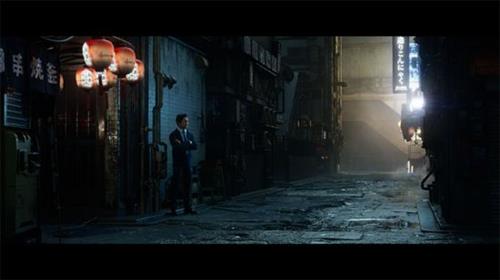
In this comprehensive workshop by Graham Cunningham, you will be taken through the entire process of lighting and compositing a cinematic shot using Maya, Katana, Arnold, and Nuke. This is an advanced course that builds on the Introduction to Katana workshop by Taeyoung Kim.
This 4-hour workshop begins with setting up OCIO for ACEScg, importing and preparing assets in Maya and Arnold, creating a layout and shot camera, managing your .tx files and color spaces, and details how to convert materials to MaterialX, and export everything to Arnold USD.
Next, in Katana, you'll discover how to update the shot template, create some new macros, prepare Interactive render filters, and set up AOVs for multi-channel EXR output. You'll see how to import your USD assets, optimize your scene, go through the lighting setup, and create and modify HDRI light textures (in a quick excursion to Nuke).
From there, the workflow proceeds to the creation of render passes, how to manage visibility and sampling, and render image sequences to disk using Katana batch commands. As the last step, Graham jumps into Nuke, where he shows how to assemble the render passes, split out light AOVs, adjust light colors and intensities. You'll also explore how to add atmosphere using volume/fog renders and WorldP data, how to add fog FX using stock footage on 3D cards, as well as how to use cryptomattes to fine-tune results, add glow, lensflare, film grain, and apply a final color grade.
Upon completing this workshop, you will have a thorough understanding of what it takes to be a lighting compositing artist. Although project files and plugins are not provided, a list of the assets used are provided with this workshop.
Graham's scene was built using the Tokyo Back Alley Kit from Big Medium Small. After assembling the scene in Nuke, Graham then utilizes animated Lingering Fog assets from Action VFX to build up the atmosphere.
Homepage
https://www.thegnomonworkshop.com/tutorials/cinematic-lighting-shot-production
Rapidgator
vkfck.Cinematic.Lighting.Shot.Production.Light..Composite.a.Shot.Using.Maya.Katana.Arnold..Nuke.rar.html
Fikper
⚠️ Dead Link ?
You may submit a re-upload request using the search feature.
All requests are reviewed in accordance with our Content Policy.
In today's era of digital learning, access to high-quality educational resources has become more accessible than ever, with a plethora of platforms offering free download video courses in various disciplines. One of the most sought-after categories among learners is the skillshar free video editing course, which provides aspiring creators with the tools and techniques needed to master the art of video production. These courses cover everything from basic editing principles to advanced techniques, empowering individuals to unleash their creativity and produce professional-quality content.
Comments (0)
Users of Guests are not allowed to comment this publication.