
| view 👀:12 |
🙍 oneddl |
redaktor: Baturi | Rating👍:
TranscriptCut 2.0.0
Free Download TranscriptCut 2.0.0 | 4.25 GB
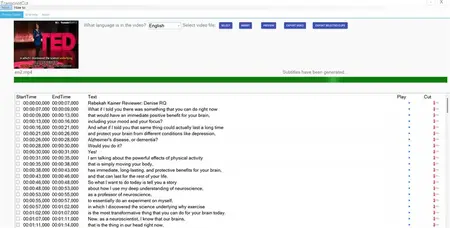
TranscriptCut: Edit Videos by Editing Text - Secure, Fast, Offline! TranscriptCut is a revolutionary video editing software that uses AI to convert speech in videos into text, allowing you to edit videos simply by editing text. All processing is done locally on your computer fully offline keeping your data completely private and secure.
Text-Based Smart Editing
Automatically converts speech in videos into transcripts. Delete unwanted text passages to precisely remove corresponding video segments. Say goodbye to tedious dragging on complex timelines-editing has never been this intuitive and efficient.
Fully Offline, Total Privacy
Powered by advanced AI models, **all speech recognition and processing happen locally on your computer**. Your videos, audio, and text are never uploaded to any server, making it ideal for handling business meetings, confidential lectures, and private videos.
Precise Positioning & Preview
Click any sentence to preview the corresponding video segment, ensuring editing accuracy. Fine-tune each clip or easily insert clips from other videos.
Multilingual Subtitles & Translation
Fully supports generating subtitles for videos in **English, French, German, Italian, Spanish, Portuguese, Polish, Turkish, Japanese, and Korean. Also supports translation into English subtitles, helping your content reach a global audience without barriers.
All-in-One Video Toolbox
More than just an editor-it's a complete video processing workstation
Audio Noise Reduction
Cleanly remove background noise and enhance voice clarity.
Video Compression
Use efficient H.265 encoding to reduce video size by up to 50%, saving valuable storage space.
Audio Extraction
Extract high-quality MP3 audio from videos with one click.
Timeline Editing
Traditional frame-accurate editing is also available for full flexibility.
Who Is TranscriptCut For?
- Educators & Students: Quickly edit course and lecture videos by removing mistakes or repetitions.
- Content Creators & Vloggers: Efficiently produce podcasts, Vlogs, and video blogs while easily generating multilingual subtitles.
- Businesses & Teams: Securely process internal meeting recordings and training videos without leaking sensitive information.
- Researchers & Academics: Analyze interviews and academic presentations with efficient qualitative tools.
- Anyone Who Works with Videos: Offers a simpler, faster, and more intuitive way to edit videos.
Technical Highlights
- Offline AI: Built-in AI models optimized for clear speech (e.g., lectures).
- Native Performance: Leverages local CPU/GPU acceleration for fast processing.
- Lossless Output: Exports videos with original resolution, bitrate, and frame rate for professional quality.
Home Page-
https://apps.microsoft.com/detail/9ngr77tz8zz5?hl=en-US&gl=USBuy Premium From My Links To Get Resumable Support,Max Speed & Support Me
Rapidgator
ozbdr.TranscriptCut.2.0.0.rar.html
UploadCloud
ozbdr.TranscriptCut.2.0.0.rar.html
Fikper
FreeDL
ozbdr.TranscriptCut.2.0.0.rar.html
Links are Interchangeable - No Password - Single Extraction
⚠️ Dead Link ?
You may submit a re-upload request using the search feature.
All requests are reviewed in accordance with our Content Policy.
Discovering free software download can be a game-changer for users looking to enhance their digital experience without breaking the bank. These platforms offer a vast array of software free download options, covering everything from productivity tools to entertainment applications. The beauty of these sites is not just the price (or lack thereof) but also the variety and accessibility they provide, ensuring that there's something for every type of user.
Comments (0)
Users of Guests are not allowed to comment this publication.