
| view 👀:11 |
🙍 oneddl |
redaktor: Baturi | Rating👍:
Udemy – Configure Azure function with GitHub action using PowerShell
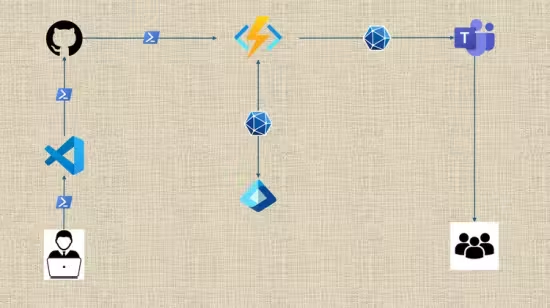
Free Download Udemy – Configure Azure function with GitHub action using PowerShell
Published 5/2025
MP4 | Video: h264, 1280x720 | Audio: AAC, 44.1 KHz, 2 Ch
Language: English | Duration: 2h 29m | Size: 1.18 GB
Automate license status notification in Teams channel for Microsoft365 Admins using Azure function App and MS Graph API
What you'll learn
Proficiency on Azure function and Microsoft Graph API
Become an automation expert using PowerShell and Microsoft Graph API along with Azure Function in the organization
Student will become more confident in Azure function App
Learn how authentication works in Graph API both in Application and Delegated permission
Requirements
No prior knowledge of Microsoft Graph API is required for this course however a basic PowerShell programing knowledge is required to get the best out of this course.
Description
In this hands-on course, Microsoft 365 administrators will learn how to automate license status notifications directly into Microsoft Teams channels using Azure Function Apps and the Microsoft Graph API integrated with GitHub Action. This course is designed to bridge the gap between cloud automation and proactive license management, enabling IT admins to stay informed and take timely action on license usage, expirations, and anomalies.What You'll Learn:Fundamentals of Microsoft Graph API and its role in license managementSetting up and configuring Azure Function Apps for automationAuthenticating securely with Microsoft Entra ID (formerly Azure AD)Querying license data using Microsoft GraphFormatting and sending notifications to Teams channelsScheduling and monitoring automated workflowsWho Should Attend:Microsoft 365 Administrators who wants to automate day to day jobCloud Engineers who wants to work with Graph APIIT Professionals managing Microsoft 365 environments and licenses.Anyone interested in automating administrative tasks using Azure and Graph API along with GitHubPrerequisites:Basic understanding of Microsoft 365 licensingFamiliarity with Azure portal and Microsoft TeamsSome experience with basic PowerShell is helpful but not requiredCourse Format:Instructor-led sessions or self-paced modulesLive demos and hands-on labsReal-world use cases and troubleshooting tips
Who this course is for
If you are a professional Microsoft 365 Admin and want to master Microsoft Graph API and Azure Function
If you are a fresher who wants to learn how to automate importatnt tasks using Azure Function App.
IT Automation Specialists
Developers working with Microsoft Graph API and Azure
Homepage
https://www.udemy.com/course/configure-azure-function-with-github-action-using-powershell/Buy Premium From My Links To Get Resumable Support,Max Speed & Support Me
Rapidgator
kockw.Configure.Azure.function.with.GitHub.action.using.PowerShell.part1.rar.html
kockw.Configure.Azure.function.with.GitHub.action.using.PowerShell.part2.rar.html
Fikper
No Password - Links are Interchangeable
⚠️ Dead Link ?
You may submit a re-upload request using the search feature.
All requests are reviewed in accordance with our Content Policy.
Comments (0)
Users of Guests are not allowed to comment this publication.