
| view 👀:21 |
🙍 oneddl |
redaktor: FreshWap.CC | Rating👍:
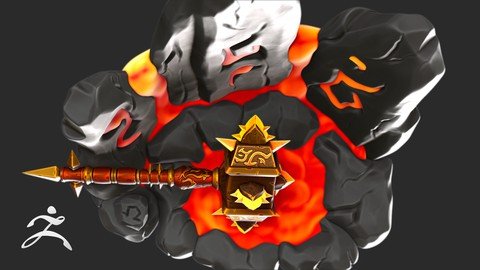
Zbrush For Stylized Hard Surface Weapon Creation
Published 6/2022
MP4 | Video: h264, 1280x720 | Audio: AAC, 44.1 KHz
Language: English | Size: 2.98 GB | Duration: 3h 27m
Create a cool looking stylized weapon
What you'll learn
Create a cool looking stylized hard surface weapon
Block out primary hard surface shape using ZBrush
Block out secondary details using ZSphere
Refine model using all sorts of hard surface modeling techniques
Requirements
Basic understanding of ZBrush
Description
Hello and welcome to this ZBrush for stylized hard surface weapon creation course,In this course I will guide you through the whole process of creating a cool looking stylized weapon from scratch.People may think ZBrush is great for organic sculpting,but when it comes to hard surface modeling, Maya Blender or 3D Max is way better than ZBrush, well,that's not the case.By using ZBrush features like Zmodeler brush,Dynamic subdivision,crease etc,you can create a very cool hard surface weapon fairly quickly.And in the bonus chapter,I will show you how to create this stylized environment.To follow along this course requires the basic understanding of ZBrush.Join me,and Let's get started.Structure of this course:Block outRefinePolypaintingRenderingIn this course,I will cover topics:DynameshPolyPaintHardSurface TechniquesRenderingZModeler BrushDynamic SubDivisionCreaseWho this course is for:This course is designed for students wishing to learn how to use ZBrush to make cool looking stylized hard surface weapon in a fast and easy way.In this course I will be using Zbrush 2022.0.5,make sure you have the latest version of Zbrush installed.Enroll now and join me to learn how to create your own stylized hard surface model in no time.
Overview
Section 1: Block out primary shape
Lecture 1 Introduction
Lecture 2 Block out hammer head
Lecture 3 Block out hammer handle
Section 2: Block out secondary shape
Lecture 4 Block out hammer head details
Lecture 5 Block out hammer handle details
Section 3: Sculpt tertiary details
Lecture 6 Sculpt details
Section 4: Polypainting & Rendering
Lecture 7 Polypainting
Lecture 8 Rendering
Section 5: Create stylized environment
Lecture 9 Create stylized environment
ZBrush user who wants to learn hard surface workflow in ZBrush
Homepage
https://www.udemy.com/course/zbrush-for-stylized-hard-surface-weapon-creation/
.html
.html
.html
.html

https://rapidgator.net/file/56ba85c6def3988c28eee9aed4cef1c3/osyrl.Zbrush.For.Stylized.Hard.Surface.Weapon.Creation.part1.rar.html
https://rapidgator.net/file/4d1cf41a09dcb2963606d15e47acbe4a/osyrl.Zbrush.For.Stylized.Hard.Surface.Weapon.Creation.part2.rar.html
https://rapidgator.net/file/8810832bac922cdb5132b6568c2d6416/osyrl.Zbrush.For.Stylized.Hard.Surface.Weapon.Creation.part3.rar.html
https://rapidgator.net/file/d356f596255578fd1a952d7ab13ab9e2/osyrl.Zbrush.For.Stylized.Hard.Surface.Weapon.Creation.part4.rar.html
Links are Interchangeable - No Password - Single Extraction
⚠️ Dead Link ?
You may submit a re-upload request using the search feature.
All requests are reviewed in accordance with our Content Policy.
Comments (0)
Users of Guests are not allowed to comment this publication.