
| view 👀:24 |
🙍 oneddl |
redaktor: FreshWap.CC | Rating👍:
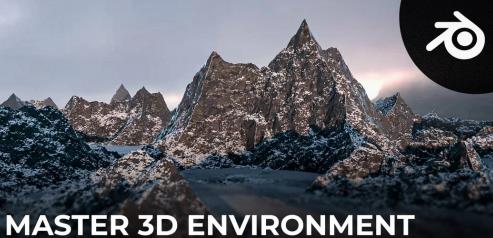
Create Realistic Looking Mountains in Blender
Create Realistic Looking Mountains in Blender
Home Page
https://www.skillshare.com/classes/Create-Realistic-Looking-Mountains-in-Blender/226367935
File Size :1.3GB
Product Details In this course, you will learn how to create a fully procedural mountain formation in Blender, just by using nodes. Not only that but you will learn a lot of useful techniques and tips all the way, that will take your 3D skills to the next level.
Here's a brief summary of all the different videos inside the course:
- Video 1: Studying References: In this video, you will learn the basics of how to study some real-life references that will guide us through the process of creating a believable mountain.
- Videos: 2/3/4/5/6/7: Creating The Mountain: In these videos, we will heavily focus on creating the basic mesh for our mountain, using the power of displacement in Blender. By the end of this part, you will have a solid understanding of how you can build complex objects just by using displacement nodes.
- Videos 8/9/10/11/12: Shading The Mountain: In these videos, you will learn how to create the material for the mountain. That includes the Rocks and the Snow, and we will create all of them procedurally so that by the end of this part, you will be able to create some really cool materials for your environments.
- Videos: 13/15: Baking: In these videos, you will learn how to bake the displacement map, and more importantly how to use it later to fill out the background, or maybe use it in other 3D software.
- Video 14: Camera Animation: In this video, you will learn how to create a cool cinematic camera movement easily in Blender
- Videos: 16/17: World Lighting: In these videos, you will learn how to combine the power of the sky texture that Blender comes with, with some real-life skies to get the best of both worlds
- Video 18: Adding Clouds: In this video, you will learn how how to add some clouds swimming between the mountains.
- Videos 19/20/21/22: Rendering Settings: In these videos, you will learn how to render your scene and this includes how to optimize your render settings for best performance, along with how to break down your scene into different layers, which will allow you, later on, to do some compositing work.
- Video 23: Mist Pass: In this video, you will learn how to render a mist pass that we will use later to add more atmospheric depth to the scene.
- Videos 24/25: Compositin

.html

https://rapidgator.net/file/eb9b2932788c2cb1f245e87eb1aff6a1/yp0f7.C.R.L.M.i.B.rar.html
Links are Interchangeable - No Password - Single Extraction
⚠️ Dead Link ?
You may submit a re-upload request using the search feature.
All requests are reviewed in accordance with our Content Policy.
Comments (0)
Users of Guests are not allowed to comment this publication.