
| view 👀:42 |
🙍 oneddl |
redaktor: FreshWap.CC | Rating👍:
Samplecraze Shaping Drum Sounds for Layering TUTORiAL
Samplecraze Shaping Drum Sounds for Layering TUTORiAL
Home Page
https://samplecraze.com/product/shaping-drum-sounds-for-layering/
Genre / Category:Sound & Production
File Size :51 MB
Product Details Before you start to layer drum sounds there a few steps you need to take to ensure all the samples are at the same volume and have all dead spaces removed before and after the sample. This is an Old School technique called 'topping and tailing'. Topping refers to normalising the audio to a specified ceiling value (usually at just below 0) and tailing refers to the removal of dead space and the application of fade-outs if required.
If you want to brush up on the normalisation process then this FREE video tutorial should help: Normalisation – What it is and how to use it
These prep steps are important if you want to layer samples. Having all the sample start times start at 0 and with gains being matched ensures you can layer without any timing and level problems. Additionally, by making sure samples start at 0 we are guaranteed that triggering will be the same for all the samples. The worst scenario is having two samples that start at different times and at different volumes.
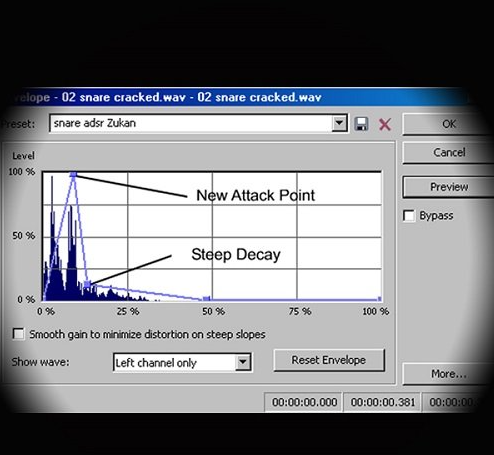
Once we have topped and tailed the drum samples we can use the envelope shaper tool to shape each sound to suit our needs. Quite often I will use the envelope tool to remove the attack component of a kick drum sound and replace it with the attack component from another drum sound, or I might use the attack from a snare sound and layer it with the body of a kick drum. By using the envelope tool we can remove any part of a drum sound and use it on another drum sound. The possibilities are endless.
In the Shaping Drum Sounds for Layering video, I show you the Old School technique of 'topping and tailing' which refers to truncating the start and end times of a sample and normalising it. I show you how to use the envelope tool in Soundforge to shape drum sounds. I explain each and every process step by step.
The plugin used in this video:
Sound Forge
Topics covered in this video:
•What are ADSR Elements
•How to create the Elements
•Using Envelope Generators to Shape Elements
•How to use an Audio Editor
•Topping and Tailing
.html
https://rapidgator.net/file/26aaeb81b6fdd688515998c4b70620ef/Shaping_Drum_Sounds_for_Layering.rar.html
⚠️ Dead Link ?
You may submit a re-upload request using the search feature.
All requests are reviewed in accordance with our Content Policy.
Comments (0)
Users of Guests are not allowed to comment this publication.