
| view 👀:34 |
🙍 oneddl |
redaktor: FreshWap.CC | Rating👍:
Jonathon Parker - Create GUI in Maya with MASH
MP4 | Video: h264, 1280x720 | Audio: AAC, 44.1 KHz
Language: English | Size: 924 MB | Duration: 1h 27m
Harness the Power of MASH to create stunning GUI Elements
What you'll learn
Understand how to Design GUI
Use a Booleans technique to animate a reveal
Understand how to use MASH to create your GUI
Understand how your rendered GUI fits in at the compositing stage
Requirements
You will need a copy of Maya 2017 or later and also a copy of either After Effects or Nuke
Description
MASH is a very powerful Motion Graphics and Visual Effects plugin that now ships with Maya. It is a procedural system that allows you to create complex simulations and animations with an easy-to-use interface.
MASH is often used in motion graphics scenarios. However, MASH can easily be harnessed in a Visual Effects shot as it has plenty of scope to create dynamic and realistic simulations, especially when combined with the rendering power of Arnold.
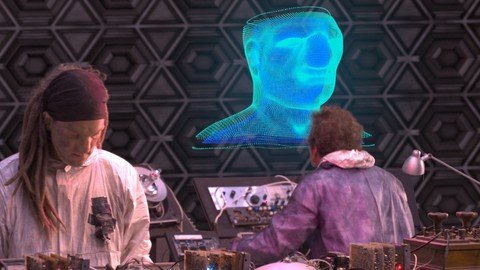
GUI is a popular area of Visual Effects and Motion Graphics. Being present in many Marvel films and plenty of other sci-fi films it is a visual that many people are familiar with.
This course aims to break down the process of creating GUI elements in MASH for Maya that are ready for film. These GUI elements will be rendered in Arnold for our VFX shot and we will aim to composite these elements into a greenscreen plate. The course will briefly cover chroma keying in After Effects and Nuke but the primary focus is the utilisation of MASH to create the GUI elements.
The pre-requisites to this course are as follows
A basic understanding of navigating Maya
Access to a copy of Maya from 2017 onwards
Access to After Effects and/or Nuke with an understanding of basic navigation
Previous experience of chroma keying is useful but not essential
The rest I will teach you from the ground up across 1 main exercises
Course outline
Lesson 1 - Accessing greenscreen footage (A walkthrough of where to access the greenscreen footage used in this course)
Lesson 2 - Creating and Rendering our Main GUI element (This session will introduce you to some key techniques for using MASH to create GUI elements)
Lesson 3 - Keying breakdown in Nuke (This session will show a breakdown of the keying process in Nuke)
Lesson 4 - Despill and final composite in Nuke (This session will show you some key despill methods in Nuke and it will also cover how the final composite comes together)
Lesson 5 - Keying and compositing in After Effects (This session will cover how you would approach the keying and compositing of the shot in After Effects)
Bonus Lesson - Additional GUI Assets in MASH (This Bonus Lesson will cover some additional techniques that you could use in MASH for Maya to create a wide range of additional GUI assets)
Project Task (Assignment) - (This lesson will walk you through the final assignment that you have been tasked with, summarising the skills and techniques learnt in this course.
As mentioned above in the course outline, the course will finish with a really fun assignment where you will have the opportunity to practice the skills that you have learnt in this course! I'm looking forward to seeing what you guys create so please upload your work!
I hope you enjoy this course as much as I enjoyed creating it!
Who this course is for
This course is for beginner to intermediate users of MASH for Maya
Homepage
https://www.udemy.com/course/create-gui-in-maya-with-mash/Buy Premium From My Links To Get Resumable Support,Max Speed & Support Me
.html

https://rapidgator.net/file/c6e52cecb38e9637a6a0ddfed8c3ccee/qg713.C.G.i.M.w.M.rar.html
Links are Interchangeable - No Password - Single Extraction
⚠️ Dead Link ?
You may submit a re-upload request using the search feature.
All requests are reviewed in accordance with our Content Policy.
Comments (0)
Users of Guests are not allowed to comment this publication.