
| view 👀:68 |
🙍 oneddl |
redaktor: FreshWap.CC | Rating👍:
Udemy - Arduino JavaScript Browser based Control (2021)
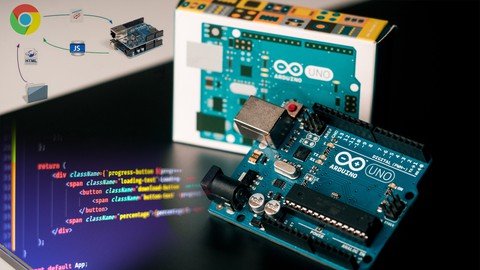
MP4 | Video: h264, 1280x720 | Audio: AAC, 44.1 KHz, 2 Ch
Genre: eLearning | Language: English | Duration: 13 lectures (1 hour, 46 mins) | Size: 0.99 GB
This course will take you in a step by step guide on how to give your Arduino superpowers using jаvascript Control
What you'll learn
Learn how to turn Arduino into a controller for your web pages written in HTML, jаvascript
Move to the next level in connecting Arduino with your Laptop/PC and unleash the power of jаvascript and HTML to Control it
Build your own Arduino Controlled web page
Build your own Arduino interactive display that listen to Arduino and Send commands to the board using a state of the art GUI web page interface
Requirements
Basic Knowledge of Programming
Basic Knowledge of Arduino
Description
>>> This course will take you in a step by step guide on how to make your own Arduino Social Distance Detector and Browser Control. <<<
Most of you know Arduino and you know that controlling Arduino using a Web browser or any interfacing technique other than the Arduino software is a very complex job. In this course, we will make this simple.
I will teach you how you can write a jаvascript code and use your own browser, the one that you already have to send commands to your Arduino board, and to receive commands from your Arduino board.
So it will be two-way communication and we won't use any Wi-Fi module or other modules. We will just use the Arduino board, USB cable, and our browser with a few lines of codes.
I will teach you something that will give your Arduino board superpower, the ability to combine Arduino or physical computing with Browser Technologies can give designers and anyone superpower to prototype awesome experience faster. Not only faster but also easier and cheaper.
In the past, Arduino was usually connected to processing software. Which is a very well known software and we have some courses explaining how to interface Arduino and processing together to generate interactive art products or services, while this is still a widely used way to connect Arduino to a computer, connecting to a browser can give a wider range of opportunity and requires less installation.
In the Past Connecting Arduino to a browser was a complex job. You had to create web sockets and a server on the device. But now with this serial API that we will introduce in this course, you can connect to any Arduino based device from the browser with the click of a button. There is no additional installation on setup required and it's a fast and easy method.
One huge benefit is that the software runs in the browser is easy to share and execute on various devices and operating systems.
The system should work with any Arduino that has a serial connection to the computer.
Why you should take this course?
Learn the basics of HTML
Learn how to interact with your Arduino from a browser
Get started without any software requirements for your computer or Arduino
Prevent crashes and errors by only loading the minimum required libraries
Get access to a comfortable learning space without any distractions
What you will learn in this course:
How using jаvascript with Arduino will give you superpowers
How to Interface Arduino with Your Computer/Laptop via jаvascript Coding
Why you should use jаvascript and browser Technologies to Control Arduino
Arduino coding process.
Upload Arduino code to the board to make it ready to receive and send a command to our computer web browser.
jаvascript coding to control Arduino.
Interface Arduino with your device, which is a laptop or computer, and connects a simple circuit
Practical application examples.
You don't need any background in jаvascript.
We will explain the line of calls that you need to use and you can replicate what we are doing and do the same on your own.
A lot of information is waiting for you inside this course, join now and start making your own.
Who this course is for:
Engineering Students - Electronics, Electrical & Computer Science
High School Science Students
Electronic Geeks, Hobb
Embedded Systems Geeks
Arduino Geeks
IoT and embedded systems Geeks
Anyone interested in connecting Arduino with a web-page without a WiFi Module or any additional circuitry
Anyone interested in Controlling Arduino through a Web Page Interface and display incoming data + the ability to send live command to Arduino via the same Web Page
Buy Premium From My Links To Get Resumable Support,Max Speed & Support Me
.html
.html

https://rapidgator.net/file/0401051d17155d4b8757ddeaa3dd46cb/rzjur.A.J.B.b.C.2021.part1.rar.html
https://rapidgator.net/file/aba10a4d1d0dea55062953b3c8e3ca92/rzjur.A.J.B.b.C.2021.part2.rar.html
Links are Interchangeable - No Password - Single Extraction
⚠️ Dead Link ?
You may submit a re-upload request using the search feature.
All requests are reviewed in accordance with our Content Policy.
Comments (0)
Users of Guests are not allowed to comment this publication.