
| view 👀:5 |
🙍 oneddl |
redaktor: Baturi | Rating👍:
Black NotePad 3.0.0 Multilingual
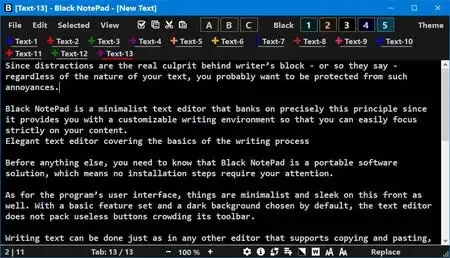
Free Download Black NotePad 3.0.0 Multilingual | 1.9 Mb
Black NotePad is a lightweight plain text editor designed to provide a more capable alternative to the standard Windows Notepad. It offers a clean working environment with additional productivity features for editing multiple text files, organizing documents, and managing editing sessions.
The application supports both casual and professional text editing tasks by combining a straightforward interface with tabbed document management, multi-window operation, and convenient navigation tools. Its flexible display options allow users to customize the workspace according to their preferences.
Black NotePad is suitable for programmers, writers, administrators, and everyday users who need an efficient editor for creating and modifying plain text documents.
Software Overview
Black NotePad extends the functionality of a traditional text editor by allowing multiple documents to be opened simultaneously using tabbed browsing or separate windows. Users can switch between files quickly, organize tabs, and restore recently closed documents during the current editing session.The software maintains a temporary history of document changes after each save, enabling users to restore previous versions of a file while the application remains open. It also keeps records of recently opened files and provides quick access to frequently used documents through a favorites system.
Its customizable interface and simplified menu mode help users create a workspace that matches their editing preferences while maintaining a clean and easy-to-use environment.
Key Features
- Edit multiple text files using tabbed documents
- Support multi-window editing mode
- Switch between display modes with ease
- Manually sort tabs or organize them alphabetically
- Restore recently closed tabs during the current session
- Maintain document history after each save
- Restore previous text versions within the active session
- Access recently opened and recently saved files
- Manage favorite files for quick access
- Simple and customizable user interface
Why Choose Black NotePad
Black NotePad provides a practical set of enhancements over the standard Windows text editor while remaining lightweight and easy to use. Its tab management, document history, and workspace customization features help improve productivity during everyday text editing tasks.The software is well suited for users who regularly work with multiple text files and want a straightforward editing environment with additional file management capabilities.
System Requirements
Operating System: WindowsFrequently Asked Questions
What is Black NotePad used for?
Black NotePad is used for creating, editing, and managing plain text documents with enhanced productivity features.Can Black NotePad open multiple files at the same time?
Yes, it supports editing multiple documents simultaneously through tabs and multi-window mode.Does Black NotePad keep document history?
Yes, it stores previous versions of text after each save during the current editing session, allowing users to restore earlier content.Home Page
https://www.wintools.info/
Product Information
- Software Name: Black NotePad
- Version: 3.0.0
- Languages: Multilingual
- License type: Full Version
- File Size: 1.9 Mb
Buy Premium From My Links To Get Resumable Support,Max Speed & Support Me
Rapidgator
xp83b.Black.NotePad.3.0.0.Multilingual.rar.html
UploadCloud
xp83b.Black.NotePad.3.0.0.Multilingual.rar.html
DDownload
xp83b.Black.NotePad.3.0.0.Multilingual.rar
FreeDL
xp83b.Black.NotePad.3.0.0.Multilingual.rar.html
Links are Interchangeable - No Password - Single Extraction
⚠️ Dead Link ?
You may submit a re-upload request using the search feature.
All requests are reviewed in accordance with our Content Policy.
Discovering free software download can be a game-changer for users looking to enhance their digital experience without breaking the bank. These platforms offer a vast array of software free download options, covering everything from productivity tools to entertainment applications. The beauty of these sites is not just the price (or lack thereof) but also the variety and accessibility they provide, ensuring that there's something for every type of user.
Comments (0)
Users of Guests are not allowed to comment this publication.