
| view 👀:3 |
🙍 oneddl |
redaktor: Baturi | Rating👍:
QueueExplorer Professional 5.0.90
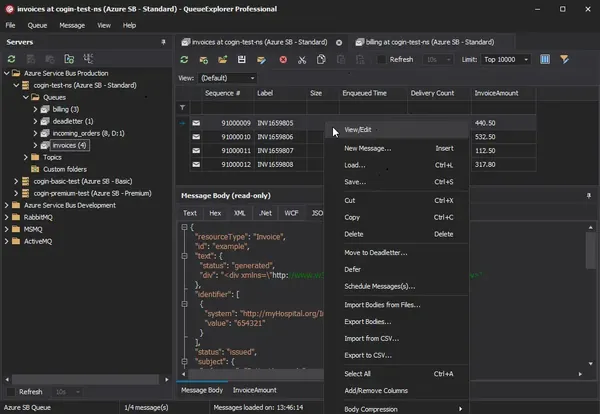
Free Download QueueExplorer Professional 5.0.90 | 35.4 Mb
QueueExplorer Professional is a message queue management and troubleshooting tool designed for developers, system administrators, and IT professionals working with enterprise messaging platforms. It provides a centralized environment for inspecting, testing, editing, and managing messages across multiple queuing systems from a single application.
The software simplifies message analysis by offering detailed viewers, queue monitoring tools, and advanced management capabilities. It helps users investigate message delivery issues, validate message content, perform testing, and maintain messaging infrastructure more efficiently.
Supporting several popular message brokers without requiring separate installations, QueueExplorer Professional is suitable for development, testing, migration, monitoring, and production maintenance of distributed messaging environments.
Software Overview
QueueExplorer Professional enables users to connect to multiple queue technologies, inspect message contents, and perform administrative tasks beyond the capabilities of standard management consoles. Messages can be viewed, edited, copied, moved, deleted, backed up, restored, or resent while preserving their properties.The application includes specialized viewers for XML, JSON, WCF, hexadecimal data, and plain text, making it easier to inspect complex message payloads. Developers can create and send custom test messages, while administrators can monitor queue activity, investigate failed or dead-letter messages, and migrate queue configurations between servers.
Key Features
- Support MSMQ, Azure Service Bus, RabbitMQ, and ActiveMQ.
- View, edit, copy, move, delete, save, and reload queue messages.
- Inspect message bodies using XML, JSON, WCF, Hex, and text viewers.
- Create and send custom test messages.
- Perform stress and performance testing with large message batches.
- Monitor queue status with automatic refresh.
- Troubleshoot failed, poison, and dead-letter messages.
- Filter and sort messages for faster analysis.
- Extract business data using XPath, JSON, or regular expressions.
- Backup and restore messages.
- Copy, compare, synchronize, and migrate queues and metadata.
- Duplicate queues with their configuration settings.
- Manage multiple messaging platforms from a single interface.
Why Choose QueueExplorer Professional
QueueExplorer Professional is designed for environments where reliable message processing is essential. Its comprehensive inspection, testing, and administrative tools help developers validate messaging workflows while allowing administrators to diagnose issues and maintain queue infrastructure efficiently.The software is suitable for enterprise messaging environments, integration projects, application testing, production monitoring, and system migration across multiple message broker platforms.
System Requirements
Windows 11, Windows 10, Windows 8, Windows 7Windows Server 2022, Windows Server 2019, Windows Server 2016, Windows Server 2012, Windows Server 2008, Windows Server 2008 R2
.NET Framework 4.6.2 or higher
Frequently Asked Questions
What is QueueExplorer Professional used for?
It is used to inspect, manage, troubleshoot, and test enterprise message queues across multiple messaging platforms.
Which messaging systems are supported?
The software supports MSMQ, Azure Service Bus, RabbitMQ, and ActiveMQ.
Can QueueExplorer Professional create test messages?
Yes. Users can create, edit, and send individual or batch test messages to validate messaging workflows.
Does the software help troubleshoot failed messages?
Yes. It provides tools for analyzing, correcting, resending, and managing failed, poison, and dead-letter messages.
Home Page
https://www.cogin.com/
Product Information
- Software Name: QueueExplorer Professional
- Version: 5.0.90
- Languages: English
- License type: Full Version
- File Size: 35.4 Mb
Buy Premium From My Links To Get Resumable Support,Max Speed & Support Me
Rapidgator
3h9lf.QueueExplorer.Professional.5.0.90.rar.html
UploadCloud
3h9lf.QueueExplorer.Professional.5.0.90.rar.html
DDownload
3h9lf.QueueExplorer.Professional.5.0.90.rar
FreeDL
3h9lf.QueueExplorer.Professional.5.0.90.rar.html
Links are Interchangeable - No Password - Single Extraction
⚠️ Dead Link ?
You may submit a re-upload request using the search feature.
All requests are reviewed in accordance with our Content Policy.
Discovering free software download can be a game-changer for users looking to enhance their digital experience without breaking the bank. These platforms offer a vast array of software free download options, covering everything from productivity tools to entertainment applications. The beauty of these sites is not just the price (or lack thereof) but also the variety and accessibility they provide, ensuring that there's something for every type of user.
Comments (0)
Users of Guests are not allowed to comment this publication.