
| view 👀:33 |
🙍 oneddl |
redaktor: Baturi | Rating👍:
WinToHDD 6.9 Multilingual + Portable
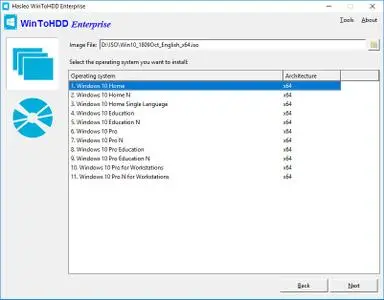
Free Download WinToHDD 6.9 Multilingual All Editions + Portable Fast Links | 17.9/55.1 Mb
WinToHDD is a handy and useful software which allows you to install or reinstall Windows (Vista/2008 or later) without using a CD/DVD/USB drive. With this All-in-One Microsoft Windows deployment tool, you can easily reinstall Windows, install Windows onto disks other than the one where your Windows is installed, or clone existing Windows installation to other disk. Furthermore, you can use it to create a Windows installation USB containing all your Windows installation ISO files, then you can install Windows (Vista/2008 or later) from the same USB drive on both BIOS and UEFI computers.
Install, Reinstall, Clone Windows 11/10/8/7/Vista & Windows Server Without CD/DVD/USB Drive!
- Install/reinstall Windows from ISO, WIM, ESD without using CD/DVD/USB.
- Clone Windows to another disk without reinstalling Windows, apps.
- Easily bypass Windows 11 system requirements (TPM 2.0, RAM, internet connection, etc).
- Encrypt Windows partition with BitLocker when installing or cloning.
- Install any version of Windows 11/10/8/7/Vista, Server 2008 or later (64 & 32 bits) from same USB drive on both BIOS and UEFI computers.
- Fully compatible with GPT/UEFI and Windows UEFI CA 2023.
Reinstall Windows Without Using CD/DVD/USB Drive
The reinstall Windows feature allows you to reinstall Windows 11/10/8.1/8/7/Vista & Windows Server 2008 or later directly from an ISO, WIM, ESD, SWM, VHD or VHDX file without using a CD/DVD or USB drive. With this feature, even if you don't know anything about computer technology, you can easily reinstall Windows with just a few clicks, and it can help you bypass Windows 11 system requirements such as TPM 2.0 requirement, RAM requirement, internet connection requirement, etc.
Install Windows Without Using CD/DVD/USB Drive
With this feature, you can easily install Windows 11/10/8.1/8/7/Vista & Windows Server 2008 or later onto disks other than the one where your Microsoft Windows operating system is installed, using an ISO, WIM, ESD, SWM, VHD, VHDX image file or a CD/DVD drive as the source of installation. This feature can help you bypass Windows 11 system requirements such as TPM 2.0 requirement, RAM requirement, internet connection requirement, etc.
Migrate Windows to SSD or New Hard Disk
The system clone feature allows you to clone existing Windows OS installation (Windows 11/10/8.1/8/7/Vista & Windows Server 2008 or later) from the old disk to a new disk (HDD/SSD), with this feature you can generat an exact copy of the existing Windows system to another disk.
Create Multi-Installation USB to Install or Clone Windows
You can create a Windows installation USB flash drive to install any version of Windows (Vista/2008 or later, both 64 & 32 bits) from the same USB drive on both BIOS and UEFI computers. The bootable USB flash drive also contains the system clone feature, so you can use it to clone Windows OS installation from one disk to another.
Home Page - https://www.easyuefi.com/
Buy Premium From My Links To Get Resumable Support,Max Speed & Support Me
Rapidgator
55fxl.WinToHDD.6.9.Portable.rar.html
55fxl.WinToHDD.6.9.rar.html
DDownload
55fxl.WinToHDD.6.9.Portable.rar
55fxl.WinToHDD.6.9.rar
FreeDL
55fxl.WinToHDD.6.9.Portable.rar.html
55fxl.WinToHDD.6.9.rar.html
Links are Interchangeable - No Password - Single Extraction
⚠️ Dead Link ?
You may submit a re-upload request using the search feature.
All requests are reviewed in accordance with our Content Policy.
Discovering free software download can be a game-changer for users looking to enhance their digital experience without breaking the bank. These platforms offer a vast array of software free download options, covering everything from productivity tools to entertainment applications. The beauty of these sites is not just the price (or lack thereof) but also the variety and accessibility they provide, ensuring that there's something for every type of user.
Comments (0)
Users of Guests are not allowed to comment this publication.