
| view 👀:47 |
🙍 oneddl |
redaktor: Baturi | Rating👍:
Abyssmedia MCRS System 4.4 Portable
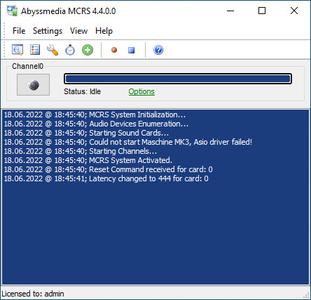
Abyssmedia MCRS System 4.4 Portable | 3.3 Mb
Abyssmedia Multi-Channel Sound Recording System designed for recording audio information from multiple sources simultaneously and automatically. The sound recording software can record up to 32 channels and compress records for archiving. It can be used for conference recordings, telephone line monitoring, radio station logging, logging of intermittent transmissions and Other specialized applications...
Multichannel recording
A robust and stable logger engine allows you to record up to 32 channels simultaneously on a single computer. You can use various types of audio interfaces, from built-in codecs to multi-channel external USB interfaces, to achieve the required number of channels. Note that switching from stereo to mono allows you to double the number of channels with the same hardware. Each sound card runs in a separate thread, increasing the stability of the program as a whole.
ASIO and WDM support
The audio logger is available in two versions, WDM and ASIO. The first option is good for a few cheap sound cards that only support stereo recording. Multi-channel audio interfaces usually do not allow to use all the features with WDM drivers, so especially for them, we created the ASIO version.
Flexible channel settings
You can set a different operating mode for each of the recording channels - manual or automatic, with voice activation. Voice activation mode eliminates 'dead air', which in turn saves disk space usage significantly. You can select a separate folder to store the audio recordings of each channel. Regardless, the location of all timestamped recordings is always stored in the database.
Audio recordings management
For easy management of recordings, they are automatically divided into individual segments. You can change the duration of the segments in the program settings and also synchronize them with the time of day, making it more convenient to work with. When splitting a recording into parts, a situation can occur where the recording breaks off in the mid-word. To avoid such problems, you can set an overlap time between two consecutive recordings.
Recording scheduler
The scheduler allows you to set individual time slots for each channel. The number of time slots for each channel is unlimited. The channels remain in their original mode - they operate either in manual mode or with voice activation.
Recording browser
You can use a single browser with playback, sorting and search capabilities to access your audio recordings. In addition to this, you can also install a free audio-editing extension.
Volume Control
In most cases you will be using AGC to adjust the recording level in real time. Despite its convenience, it does not always give acceptable results and is not available for all audio interfaces. Alternatively, you can use the normalization function to simply equalize the volume between channels. Since the final volume level will already be known at that point, no additional scanning will be necessary.
Output formats
The most common audio formats used to store recordings are MP3 and WAV. MP3 is well suited for voice recordings where high quality is not required. WAV, on the other hand, provides lossless compression. Based on this, you can choose between audio quality and audio file size. Never increase the sampling rate unless it is really necessary. Bear in mind that higher recording quality increases data flow. As a consequence, this increases the speed requirements for the hard drives.
Security
Unauthorized actions can lead to the loss of important information. To prevent tampering, you have the option of setting a password to change program settings, view audio recordings or stop recording. All events that occur while the program is running are recorded in logs and can be viewed at any time.
System Requirements:
Microsoft Windows Vista/7/8/10
Microsoft Internet Explorer 6 or higher
DirectX 9.0 or better
Pentium III processor or faster
256 MB RAM or more.
To record 2 mono channels - buy a simple Y cable from your local electronics to wire 2 mono sockets to a stereo plug. Then using Channel Properties assign one channel to "left mono" and the other to "right mono".
Multichannel Recording required multiple standard sound cards or multichannel sound cards. Depending on hardware resources you can install up to 4 sound cards in one PC. (ie. a total of 8 inputs).
Multichannel sound cards that have been tested including the M-Audio Delta 44, M-Audio Delta 1010, ESI Maya 44, Antex LX-44, RME FireFace 400, TASCAM US 4x4, Dialogic 12-channels interface cards.
USB sound devices. USB devices usually can be used with a hub to connect many devices to one PC. Most modern USB sound devices let you do this.
Microphones or telephone adapters
Home Page-
https://www.abyssmedia.com/mcrs/

https://rapidgator.net/file/16f95352f3919733c600ba8fb8b21ca0/ln6yy.Abyssmedia.MCRS.System.4.4.Portable.rar.html
⚠️ Dead Link ?
You may submit a re-upload request using the search feature.
All requests are reviewed in accordance with our Content Policy.
Discovering free software download can be a game-changer for users looking to enhance their digital experience without breaking the bank. These platforms offer a vast array of software free download options, covering everything from productivity tools to entertainment applications. The beauty of these sites is not just the price (or lack thereof) but also the variety and accessibility they provide, ensuring that there's something for every type of user.
Comments (0)
Users of Guests are not allowed to comment this publication.