
| view 👀:75 |
🙍 oneddl |
redaktor: Baturi | Rating👍:
Ashampoo 3D CAD Professional 14.0.0 (x64) Multilingual + Portable
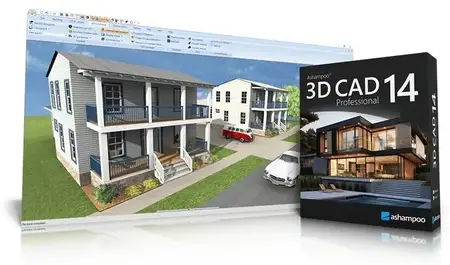
Free Download Ashampoo 3D CAD Professional 14.0.0 (x64) Multilingual + Portable Fast Links | 1.7/1.88 GB
Ashampoo 3D CAD Professional 14 is a comprehensive 3D CAD solution for professional architectural and construction planning. From detailed floor plans and sections to fully developed 3D building models, the software supports the complete design process with precision and technical reliability. Advanced construction tools, structured project management, and extensive object catalogs enable efficient planning of residential, commercial, and public building projects.
With integrated IFC-2x3 export, optimized elevation views, and powerful tools for creating fire escape plans, Professional 14 goes beyond pure design-providing a CAD environment built for modern BIM workflows and demanding project requirements.
New design and construction tools
Numeric inpPowerful electrical planning assistant included!
Electrical planning has never been easier: With the new assistant, you can place outlets, switches, and lights exactly where you need them-with just a few clicks. Choose from predefined room types and equipment configurations or create your own templates. The assistant automatically analyzes your rooms and suggests optimal placements-saving you time and helping you avoid mistakes. Whether you're a beginner or a pro, this feature makes electrical planning faster, easier, and more intuitive!
Customization and full control over electrical symbols
In addition to the built-in symbols, you can add and manage your own electrical symbols. Use custom directories to directly integrate personalized elements into your plans. The assistant automatically creates a dedicated layer for electrical symbols, so you can show or hide the entire electrical installation with a single click. You can also manually move, rotate, and adjust all symbols-for maximum flexibility and precision! The assistant even auto-enhances your planning with a parts list of all electrical components used in your project.
New doors and sliding doors-enhancing design flexibility for more realistic drafts
New door models give you even more creative options. Innovative extra: Doors with asymmetrical wall openings. Now you can realistically depict sliding doors with track systems and without awkward overlaps. This added flexibility lets you design your floor plans even more accurately and individually, perfect for modern open concepts and advanced architectural projects!
New feature highlights
Plan Layout with multiple views on a single sheet
Scaled plan layouts with PDF output
2D drawing functions for adding drawing details and enhancing floor plans
Insert scanned floor plans (JPG, PNG) as images and use them as a blueprint to trace your 3D building model
Extended 2D drawing functions with custom line types and hatching
Create and edit custom 2D symbols
Combinable roof extensions and roof openings
Extended roof variants including hall roofs
Integrated 3D Converter with material and texture editing
Standards-compliant fire escape plans directly from the project
With the integrated Fire Escape Plan Plugin, standards-compliant safety plans can be created directly based on existing floor plans. A wizard assists with scale, drawing frame placement, and layout, while a comprehensive 2D symbol catalog and automatic legend generation streamline implementation. In addition, a structured export of all used 2D symbols is available-ideal for documentation and coordination. Professional 14 significantly expands its application scope for commercial and public construction projects.
IFC export for professional BIM workflows
With the integrated IFC-2x3 Export PlugIn, Ashampoo 3D CAD Professional 14 becomes fully BIM-compatible. Complete 3D building models can be exported, including structural elements such as walls, ceilings, floors, and roof structures, as well as finishing elements like windows, doors, and stairs. 3D catalog objects and custom 3D constructions are also reliably transferred. This allows planning data to be integrated into architectural, structural engineering, or cost-estimating software, enabling efficient collaboration within connected project environments. Professional here means full control over data and future-proof standards.
Powerful design an construction tools
Numerical input tools are the ultimate solution for precise planning, which is why the program heavily emphasizes this aspect! Dedicated input modes for walls, windows, and doors make your work incredibly easy, while numerical editing tools for the same areas add more precision and flexibility to your projects. Together with custom components for windows and doors, roller shutter boxes, blinds and borders, the design and construction section is a genuine highlight of the software!
Extensive object catalogs
Ashampoo® 3D CAD Professional is popular also because of the vast number of included 3D objects. Select from a variety of suitable 3D objects and over 250 ready-to-use object groups in the object catalog! The catalog includes groups full of pre-designed garages, kitchen lines, garden houses, and saunas, among others. Create your own catalog directories and use them directly in the catalogs, it couldn't be more convenient! Look forward to a program that sets hardly any limits for you and your projects!
Less is more?
Great, then our Ashampoo® 3D CAD Architecture is what you want! You don't need to import/export of 2D DXF/DWG files or export Maxon Cinema 4D files, and you don't want to construct windows yourself? But you still want a comprehensive, fully-fledged CAD application? Then the more affordable Ashampoo® 3D CAD Architecture is the ideal solution for you! After all, why should you pay for high-level professional features you won't be using anyway? Check out the comparison matrix and find the solution that is right for you!
Operating System:
Windows 10 / 11
Home Page-
https://www.ashampoo.com/en-us/3d-cad-professional-14
Buy Premium From My Links To Get Resumable Support,Max Speed & Support Me
Rapidgator
zq5x0.3D.CAD.Professional.14.rar.html
zq5x0.Ashampoo.3D.CAD.Professional.14.0.0.Port.rar.html
DDownload
zq5x0.3D.CAD.Professional.14.rar
zq5x0.Ashampoo.3D.CAD.Professional.14.0.0.Port.rar
FreeDL
zq5x0.3D.CAD.Professional.14.rar.html
zq5x0.Ashampoo.3D.CAD.Professional.14.0.0.Port.rar.html
Links are Interchangeable - No Password - Single Extraction
⚠️ Dead Link ?
You may submit a re-upload request using the search feature.
All requests are reviewed in accordance with our Content Policy.
Discovering free software download can be a game-changer for users looking to enhance their digital experience without breaking the bank. These platforms offer a vast array of software free download options, covering everything from productivity tools to entertainment applications. The beauty of these sites is not just the price (or lack thereof) but also the variety and accessibility they provide, ensuring that there's something for every type of user.
Comments (0)
Users of Guests are not allowed to comment this publication.