
| view 👀:16 |
🙍 oneddl |
redaktor: Baturi | Rating👍:
Autodesk ReCap Pro 2026.1 Update Win x64

Free Download Autodesk ReCap Pro 2026.1 | 289.9 mb
Languages Supported: English, Français, Italiano, Deutsch, Español, Português,
Čeština, Русский, Polski, Magyar, 한국어, 日本語, 中文.
Autodeskhas releasedReCap Pro 2026.1is a 3D program for complex laser scanning and photogrammetry projects. It exports files into a proprietary format, which can seamlessly integrate into other Autodesk software applications This release comprised of bug fixes, security, and performance upgrades.
Owner:Autodesk
Product Name:ReCap
Version:Pro 2026.1 Update
Supported Architectures:x64
Website Home Page :www.autodesk.com
Languages Supported:multilanguage
System Requirements:Windows *
Software Prerequisites:pre-installed Autodesk ReCap Pro 2026 and above
Size:289.9 mb
Autodesk ReCap Pro 2026 delivering game-changing enhancements that help AECO professionals maximize the value of reality capture data, optimize scan-to-BIM workflows, and enhance your project collaboration. This release introduces advanced scan-to-mesh capabilities, a new integration with Revit, ReCap Photo integration, and powerful cloud-based sync features.
What's new in ReCap Pro 2026.1
Enhanced Update Origin Tool (2026.1)
The Update Origin Tool has been enhanced with new features and capabilities.
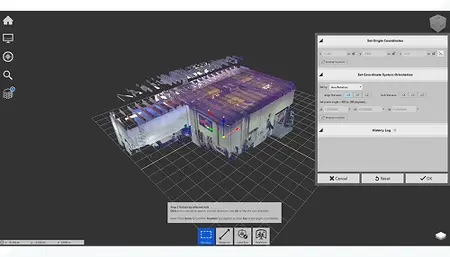
Enhancements include:
- 2-Point Axis Alignment: Select two points along any axis (X, Y, or Z) to align orientation precisely.
- Guideline Sub-Feature: Choose any two points across the point cloud-without requiring the origin to be one of them-for more flexible alignment.
- Manipulator & Field Sync: Gimbal and orientation values update dynamically after axis alignment.
- Axis Locking Support: Only one axis can be locked during orientation to prevent conflicts.
- Undo/Redo Integration: Supports full undo/redo flow for axis changes.
- History Logging: Each valid axis update is recorded in the history log for traceability.
- UI Enhancements: Helpful tooltips, intuitive cursor changes, and error prevention make the tool more robust.
Faster Access to Segmented Mesh (2026.1)
ReCap Pro 2026.1 introduces an enhanced Loading Selection system that allows users to selectively open mesh and point cloud data on demand.
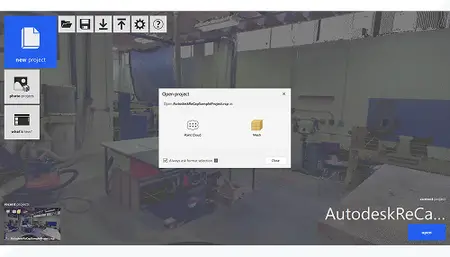
This improvement streamlines workflows by combining project status indicators with selection dialogs and popup menus into a clear and flexible interface.
Miscellaneous Enhancements and Performance Improvements (2026.1)
Learn about other miscellaneous enhancements to ReCap.
ReCap Pro
- Integrated ESRI Basemaps to the Map View tab in the Photo to 3D GCP editor.
- Added support for importing E57 files with panoramic images captured using Riegl scanners.
- Added new E57 image import options for resolution mismatch between panoramic images and scans.
- Added new DeCap commands for resolution mismatch options for E57 files.
- Added support for running multiple instances of ReCap Pro.
- Added support for exporting each classification individually similar to exporting regions.
- Added support for deleting multiple scans at once using the Project Navigator.
- Added support for deleting multiple annotations at once using the Project Navigator.
- Added a new option for removing regions automatically after converting regions to classifications.
- Added support to auto-rename the exported file if the file already exists after exporting regions.
- Improved Project Navigator annotations section to differentiate annotations and view states created using ReCap Pro and ReCap Viewer.
- Added a warning confirmation dialog to the Publish workflow when users click on the Sync from Viewer button.
Mesh Editor
- Added a project version upgrade workflow to facilitate the new origin alignment.
- Align mesh origin to point cloud origin when origin has been updated.
- Added support for Select All in the Mesh Editor.
- Added Quick Export option.
- Visible layers are now the default checked layers in the export window.
Recap Mesh for Revit
- Updated UI to reflect Revit Modernisation.
- Removal of "Generic Object" from Add to Document/Family name.
- Localization of the error messages when using Add to Document and Convert to Family.
Autodesk ReCap Prohelps designers and engineers harness the power of reality capture data with better measurement, enhanced markup, greater collaboration, search and automated registration. Use ReCap Pro to create your model from photographs or laser scans. Easily measure distances and objects; share markups, combine scans with targetless registration, and more.
Autodesk ReCap Photois an extension of Autodesk ReCap Pro made for converting Aerial and Object photographs to 3D models. These 3D models can be exported as images, videos, or models for use in other Autodesk software applications.
What's New in ReCap Pro 2026
Autodeskhelps people imagine, design and create a better world. Everyone-from design professionals, engineers and architects to digital artists, students and hobbyists-uses Autodesk software to unlock their creativity and solve important challenges.

Buy Premium From My Links To Get Resumable Support,Max Speed & Support Me
Uploady
1zz3y.Autodesk.ReCap.Pro.2026.1.rar
Rapidgator
1zz3y.Autodesk.ReCap.Pro.2026.1.rar.html
Fileaxa
Fikper
FreeDL
1zz3y.Autodesk.ReCap.Pro.2026.1.rar.html
Links are Interchangeable - No Password - Single Extraction
⚠️ Dead Link ?
You may submit a re-upload request using the search feature.
All requests are reviewed in accordance with our Content Policy.
Discovering free software download can be a game-changer for users looking to enhance their digital experience without breaking the bank. These platforms offer a vast array of software free download options, covering everything from productivity tools to entertainment applications. The beauty of these sites is not just the price (or lack thereof) but also the variety and accessibility they provide, ensuring that there's something for every type of user.
Comments (0)
Users of Guests are not allowed to comment this publication.