
| view 👀:34 |
🙍 oneddl |
redaktor: Baturi | Rating👍:
Autodesk MotionBuilder 2026.1 Win x64

Free Download Autodesk MotionBuilder 2026.1 | 1.4 Gb
Languages Supported: English , 日本語
Autodeskhas releasedMotionBuilder 2026.1, the latest version of its character animation tool, commonly used for viewing and editing motion-capture data.
Owner:Autodesk
Product Name:MotionBuilder
Version:2026.1
Supported Architectures:x64
Website Home Page :www.autodesk.com
Languages Supported:English , 日本語
System Requirements:Windows *
Size:1.4 Gb
What's new in MotionBuilder 2026
Updates to USD workflows
MotionBuilder 2026 extends USD-based workflows, USD support having been introduced last year in MotionBuilder 2025. When loading a USD stage file, the animation contained in the file is now retained, and will be rendered. A new animatable frame offset property in the Python API makes it possible to retime or time warp the motion. There is also a new button in the UI to reload USD stage proxies, and a corresponding property in the API.
Other quality-of-life improvements
Workflow improvements include a new shortcut key to force-select previously unselectable objects, and support for extended function keys - [F13] and beyond - as keyboard modifiers. There is also a new SDK property to control whether HUDs are exported in FBX files, and some API properties have been renamed for clarity.
What's new in MotionBuilder 2026.1
This release introduces new icons along with other general workflow improvements.
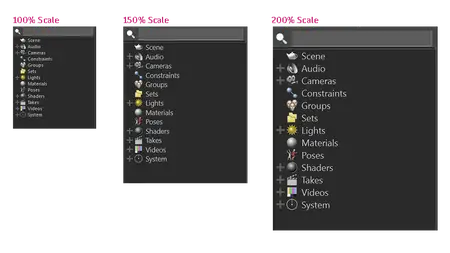
Enhanced icons and scaling support
MotionBuilder 2026.1 introduces new, high-resolution icons to enhance the user experience and support better scaling on high-DPI displays. This update ensures that icons are crisp, clear, and easy to recognize regardless of your screen resolution or size.
Configurable default scene frame rate
The default scene frame rate to use when starting MotionBuilder, or when creating a new scene, is now configurable in Preferences under the new Transport Controls section, streamlining your workflow and improving precision in animations.
New connection styles and grid snapping for Relations constraints
Connection styles
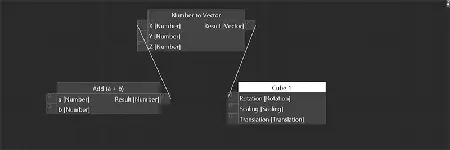
We added four new connection styles to the Relations constraints' graph interface. These connection styles are: Bezier, Straight, Corner, S-Shape, and contribute to a more efficient, flexible, and user-friendly experience when working with the Relations constraints' graph in MotionBuilder.
Grid snapping
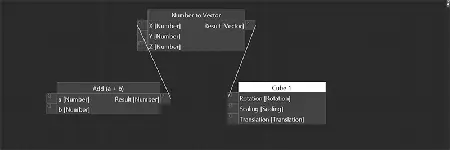
You can now activate grid snapping in a Relations constraint. Grid snapping ensures accurate alignment of boxes, which is useful when organizing complex scenes. This feature is inactive by default, but you can activate it through the contextual menu within the Relations constraint. Additionally, you can change the value of this new property when creating a new Relations constraint using the new config:
Application.txt
[Display]
RelationConstraintGridSnapping = No;
Snap relation constraint boxes to grid when dragging (Default: No) (Yes/No).
[Display]
RelationConstraintGridSnapping = No;
Snap relation constraint boxes to grid when dragging (Default: No) (Yes/No).
New search bar in the Property View
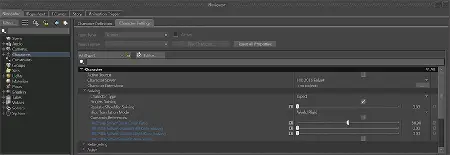
MotionBuilder 2026.1 introduces a new search bar feature within the Property View. This enhancement lets you filter the displayed properties quickly and efficiently. The search bar supports regular expressions, making it easy to locate specific properties.
New Auto-Save Unsaved Unnamed Scripts functionality in the Python Editor
A new preference named Auto-Save Unnamed Scripts on Exit is now available in the Python Editor of MotionBuilder. Active by default, this new preference keeps unnamed scripts in the Python Editor without having to either save or discard them when quitting the software. An unnamed script is surrounded by the "<>" characters, like the generic "" tab, and has never been saved to disk. This new preference is applicable when the Reload Last Scripts on Startup preference is active. For edited scripts (scripts already saved to disk but with changes unsaved), MotionBuilder will still ask you to save or discard the changes on exit, regardless of the new preference value. If MotionBuilder crashes, it will now try to automatically auto-save all unnamed scripts, regardless of the preference value. For edited scripts, it asks you to save, discard, or preserve both copies of the script. The Python Editor will display the edited version the next time you relaunch MotionBuilder. We've introduced a new config related to this new feature:
Application.txt
[Python]
AutoSaveUnnamedScripts = Yes;
Auto-save unnamed scripts (never saved to disk) on exit (Default: Yes) (Yes/No).
Added functionality to set new environment variables using License.env.[Python]
AutoSaveUnnamedScripts = Yes;
Auto-save unnamed scripts (never saved to disk) on exit (Default: Yes) (Yes/No).
We've added the MOBU_LOCATION environment variable (similar to MAYA_LOCATION), allowing you to set up required paths (like xml, pit) relative to the install without hardcoding them. Additionally, you can now set the environment variables AUTODESK_ADLM_THINCLIENT_ENV, MOBU_LEGACY_THINCLIENT, and ADSKFLEX_LICENSE_FILE in the bin\License.env file.
Updates to the MotionBuilder SDK
We implemented a new addition to the FBUndoManager class: the TransactionAddObjectCreate SDK method. This new method enhances your workflow by adding object creation to the Undo stack. With TransactionAddObjectCreate, you can now easily undo and redo object creation actions, providing better control over your project. We also introduced a new FBVector4MatrixMult SDK helper function. Unlike the previous FBVectorMatrixMult function, which didn't compute a real 4x1 vector by a 4x4 matrix (as it always considered the value of 1 for the 4th component of the vector), the new FBVector4MatrixMult function now provides a true mathematical implementation, improving the precision and reliability of your scenes.
Autodesk's MotionBuilderis the most widely used tool for editing and live-streaming motion capture data. It can be used for both virtual cinematography, motion capture, and traditional keyframe animation. The most common usage is for cleaning up your motion capture data and streaming it into other engines such as Unity and Unreal. Many of high-end users use MotionBuilder to do the final tweaks on their recorded motion capture data before they use it in their final 3D tool. The ability to write custom scripts and the fact that MotionBuilder has been used in so many productions, has made it an industry standard.
MotionBuilder Basics
Autodeskhelps people imagine, design and create a better world. Everyone-from design professionals, engineers and architects to digital artists, students and hobbyists-uses Autodesk software to unlock their creativity and solve important challenges.

Buy Premium From My Links To Get Resumable Support,Max Speed & Support Me
Rapidgator
AutodeskMotionBuilder20261.html
UploadCloud
9frf3.Autodesk-MotionBuilder-2026-1.rar.html
Fikper
FreeDL
9frf3.Autodesk-MotionBuilder-2026-1.rar.html
Links are Interchangeable - No Password - Single Extraction
⚠️ Dead Link ?
You may submit a re-upload request using the search feature.
All requests are reviewed in accordance with our Content Policy.
Discovering free software download can be a game-changer for users looking to enhance their digital experience without breaking the bank. These platforms offer a vast array of software free download options, covering everything from productivity tools to entertainment applications. The beauty of these sites is not just the price (or lack thereof) but also the variety and accessibility they provide, ensuring that there's something for every type of user.
Comments (0)
Users of Guests are not allowed to comment this publication.