
| view 👀:17 |
🙍 oneddl |
redaktor: Baturi | Rating👍:
SolidCAM Products 2026 SP0 Win x64 Multilanguage
SolidCAM Products 2026 SP0 | 18.2 Gb
SolidCAM Products is an integrated computer-aided manufacturing (CAM) solution designed for CNC programming, machining simulation, and toolpath generation. It works directly within supported CAD environments, allowing engineers and manufacturers to create, verify, and optimize machining operations while maintaining design data consistency.
The software provides CAM capabilities for a wide range of manufacturing processes, including milling, turning, mill-turn, multi-workpiece machining, and Wire EDM. Its integration with CAD platforms helps users develop machining strategies directly from 3D models while preserving toolpath associativity when design changes occur.
SolidCAM provides tools for handling complex production requirements, from preparing machining setups and managing fixtures to simulating operations before manufacturing. The platform is designed to help reduce manual programming tasks, improve workflow organization, and support efficient CNC production environments.
SolidCAM is pleased to announce the availability of new version CAM software -SolidCAM 2026 SP0 is the leading Integrated CAM software which runs directly inside in SOLIDWORKS, Autodesk Inventor and Solid Edge, with seamless integration and full tool path associativity.
SolidCAM 2026 introduces a broad set of new functionalities focused on helping manufacturers programme faster, manage complex setups more easily, simulate with greater confidence and reduce unnecessary manual work across milling, turning, mill-turn, multi-workpiece and Wire EDM workflows. This release is especially focused on practical productivity: cleaner project packaging, faster simulation, smaller files, better fixture and machine setup control, improved turning strategies, and more efficient programming for advanced production environments.
Key Features:
- Integrated CAM environment inside SOLIDWORKS, Autodesk Inventor, and Solid Edge
- Maintains toolpath associativity with CAD design changes
- Supports milling, turning, mill-turn, multi-workpiece, and Wire EDM workflows
- Provides CNC toolpath creation and machining simulation tools
- Helps manage complex machine setups and fixture configurations
- Improves project organization and machining data management
- Supports advanced manufacturing workflows with multiple machining operations
- Provides simulation tools for reviewing machining processes before production
- Helps optimize CNC programming efficiency and reduce manual preparation work
What's new in SolidCAM 2026
Cleaner Project Handling and General Workflow Improvements
One of the first workflow changes users will notice is the update to the previous "Send To" command, which is now renamed "Pack and Go." This aligns the command more closely with other CAD integrations and makes the purpose of the tool clearer for users who need to share or archive a complete CAM project.
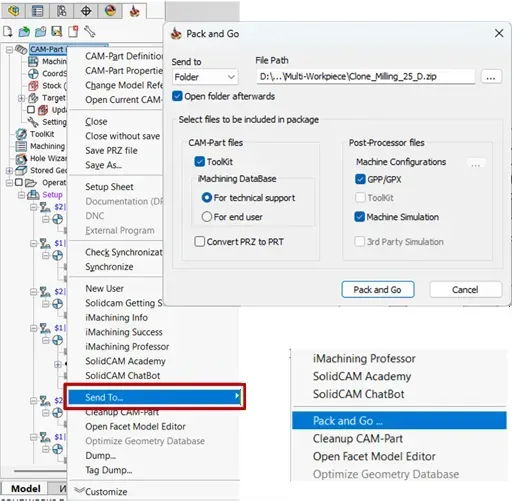
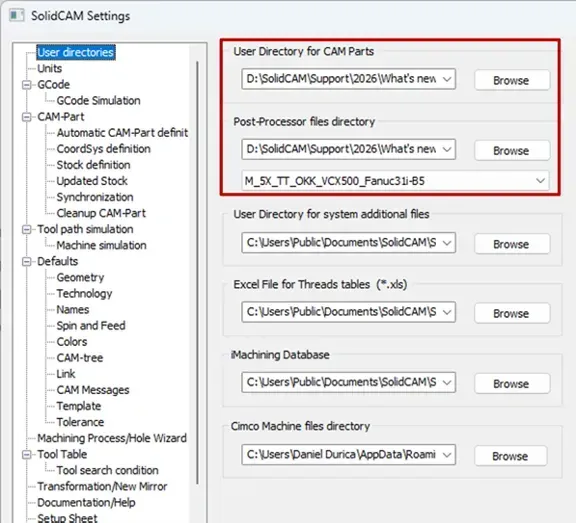
The Pack and Go workflow has also been simplified into a single interface, removing separate dropdown options and avoiding unnecessary pop-up messages. Users can open the output folder immediately after packing the project, include or exclude Toolkit files, export post-processor configurations, machine simulation data, and third-party simulation files, and optionally exclude GPP or GPX files where required. The selected options are remembered for the next Pack and Go run, helping make repeat project transfer tasks faster and more consistent. General setup has also been refined. The CNC-Controller path has moved into User Directories, CIMCO machine path settings have been added, Quick Tool Selection can now display more tool items, and the CAM-Part machining type is automatically determined from the selected machine configuration. For teams with large post-processor libraries, the new CNC-Machine Filter makes it easier to find and select the right machine.
Smarter 2.5D Milling and Feature-Based Programming
SolidCAM 2026 improves day-to-day 2.5D programming by reducing repetitive geometry selection and making recognised features more useful. Operations can now be created directly from Feature Groups in the CAM-Tree, allowing programmers to visualise a group and apply an operation from it more efficiently.
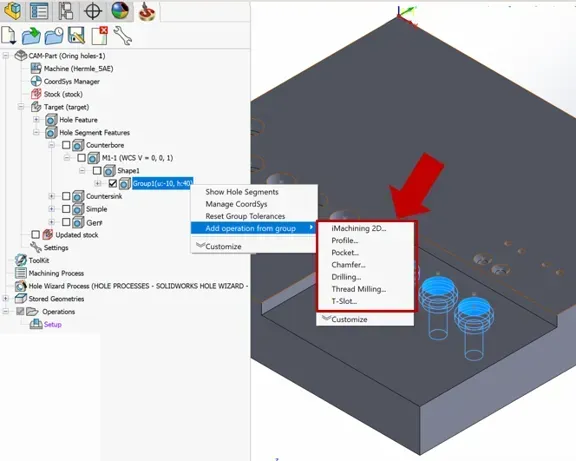
Levels can also be picked directly from recognised hole features, either from the Levels dropdown or the flyout image. This is available across common operations including iMachining 2D, Profile, Pocket, Chamfer, Drilling, Thread Milling and T-Slot, helping users programme from recognised geometry with fewer manual steps.
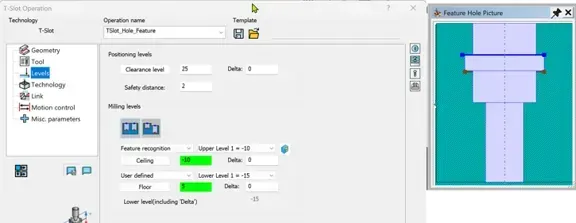
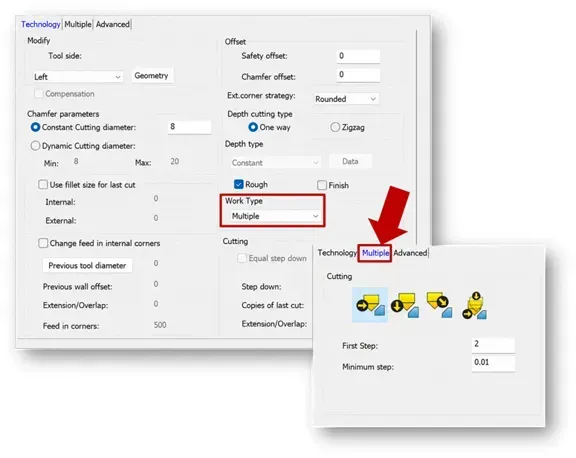
Several machining strategy updates also improve control and stability. T-Slot machining now supports a helical toolpath on the wall, Profile and Pocket operations can use a Ramping Delta Z in Lead In and Lead Out, and Multi-Step Chamfering provides better support for large chamfers by removing material in multiple controlled passes. SolidCAM also prevents mirrored transformations where Updated Stock would create empty toolpaths, helping avoid invalid operations before they reach calculation.
ToolKit and Cutting Condition Improvements
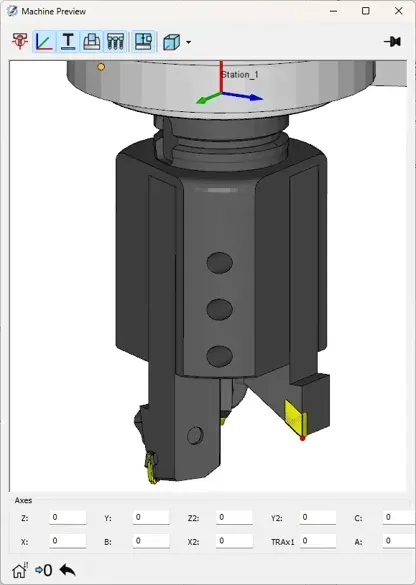
ToolKit receives several usability improvements aimed at making tool management faster and clearer. In Machine Preview, a red dot now indicates the active cutting point for multi-cutter tools and updates dynamically as cutting point settings change. Users can also select multiple tools with CTRL or SHIFT and apply cutting conditions, turret settings, or coolant settings across the CAM-Part in fewer clicks.
Working Conditions have also been expanded with new parameters including step down, stepover percentage, ramp angle, helical diameter, ramp feed, and ramp spin.
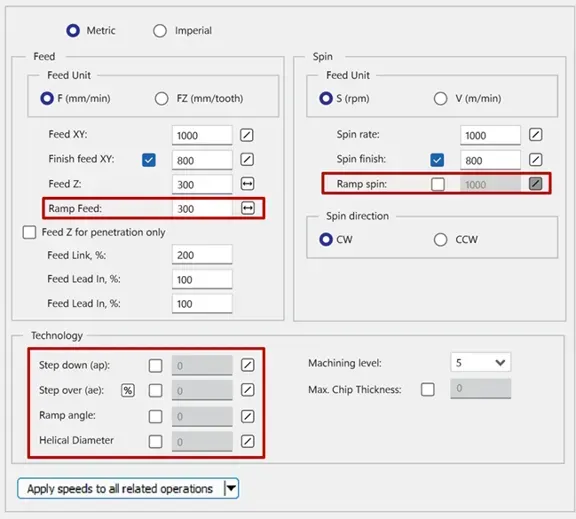
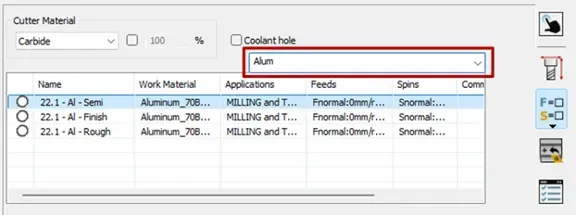
Optional parameters can be controlled with checkboxes, ranges can be defined, and the selected data is then carried into jobs accordingly. A new search bar for Cutting Conditions helps users quickly find conditions by name or work material, reducing time spent navigating larger tool libraries.
Multi-Workpiece Machining for Better Machine Utilisation
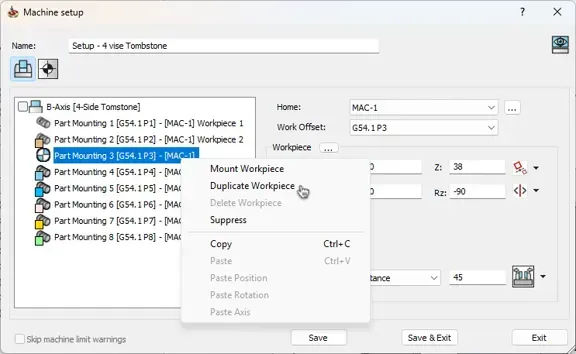
A major focus in SolidCAM 2026 is multi-workpiece machining, for multi-part and multi-operation setups where spindle utilisation needs to be maximised. The workflow allows users to manage multiple workpieces and their work offsets within a single programme cycle, supporting production scenarios such as multi-vise setups, same-side machining, multi-orientation machining, tombstones, pyramid fixtures, multi-table setups, and mill-turn workpieces from a single bar. The Workpiece Configuration Manager gives an overview of active jobs for each workpiece and allows users to suppress or unsuppress individual or multiple jobs. The Operation Sequence Manager then helps control and optimise job execution order, with automatic sorting to reduce tool changes and vise-to-vise movement. This makes it easier to manage complex production setups while keeping programming organised and efficient.
Faster, More Flexible Simulation
SolidCAM Simulator gains significant performance and usability enhancements in 2026. GPU-based simulation is available as a selectable simulation theme and can deliver up to 10x faster simulation compared with regular CPU simulation. It supports Solid Verification, clash detection, target and machined stock comparison, and adjustable stock rendering resolution. For detailed target and stock comparison, Ray Tracing can also be used. For users without the system requirements for GPU simulation, CPU Sampled Stock Simulation offers an alternative route to faster verification, with performance improvements of up to 5x compared with regular CPU simulation. A new Kinematic Simulation mode is also introduced in beta, based on the SolidCAM Simulator engine, providing full machine simulation, collision control between simulation elements and target-to-stock comparison for milling operations.
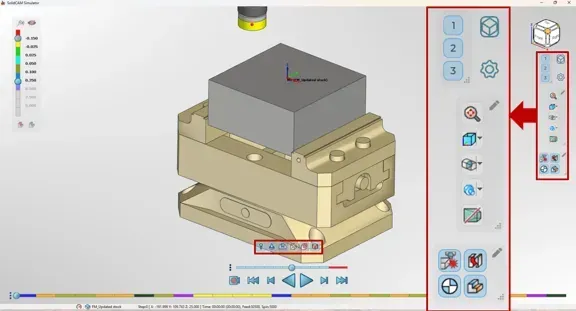
The simulation user interface is also more flexible. Floating panels can host frequently used simulator options, the view cube now supports missing corners and edges with shortest-roll alignment behaviour, perspective view is available in both standard and kinematic simulation and Stop on Next can pause playback at key events such as collisions, job changes, tool changes, feed changes, Z changes or rapid motion.
Turning, MCO and Synchronisation Enhancements
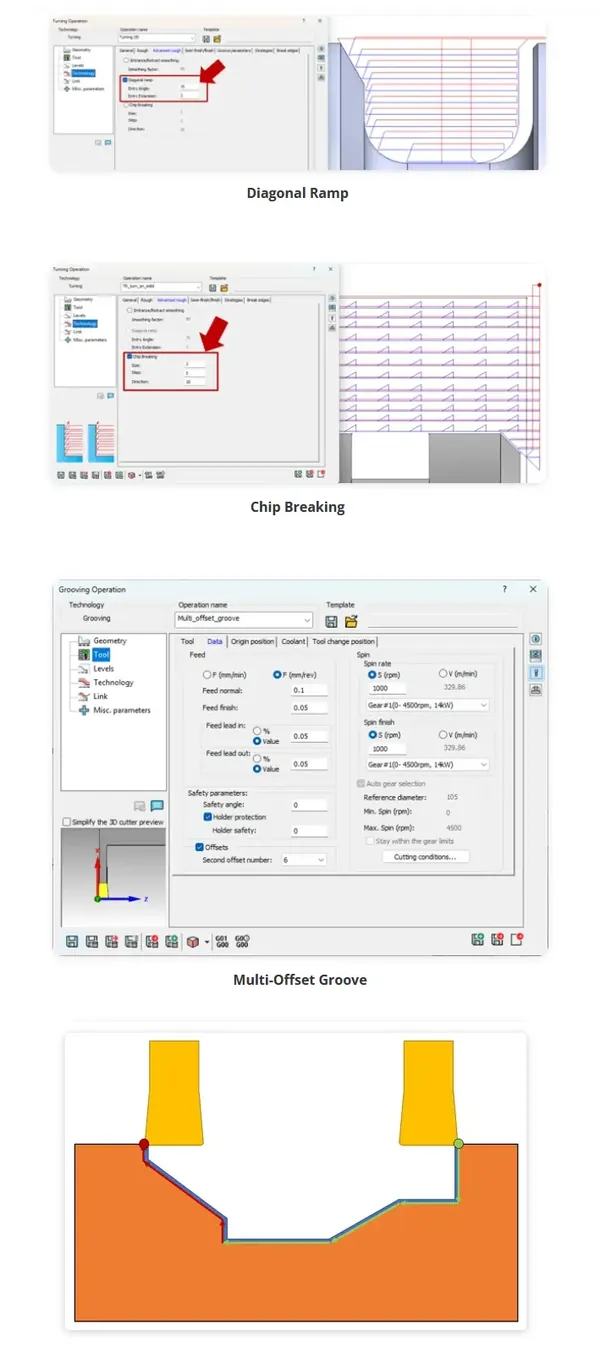
Turning receives several practical improvements for stability, chip control, and set-up reliability. Safety approach and retract point selection now better considers workpiece orientation relative to the table or spindle, which is especially useful when working on the back spindle. New turning strategies include diagonal ramp entry, thin-part cut-off with intermediate steps, chip breaking for roughing, and a multi-offset groove strategy that can use multiple offsets on a groove cutter in a single job.
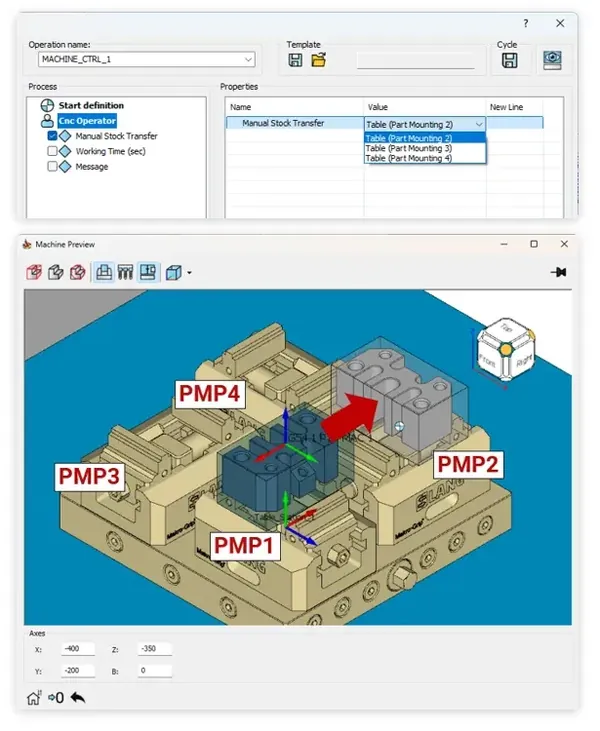
MCO workflows have also been updated. CNC Operator can now move the workpiece within fixture mounting points, axes synchronisation can be defined for non-parallel axes in VMID and used in MCO, and Cycle Save includes an option to output the function result. Automatic Synchronisation helps improve machine utilisation, reduce cycle time, and reduce or eliminate manual synchronisation work by adding process splits, synchronisation marks, and axis patterns more efficiently.
Machine Setup, Performance and Wire EDM Updates
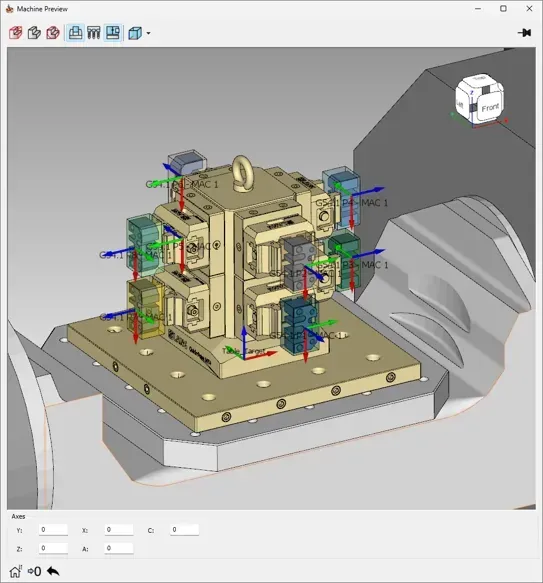
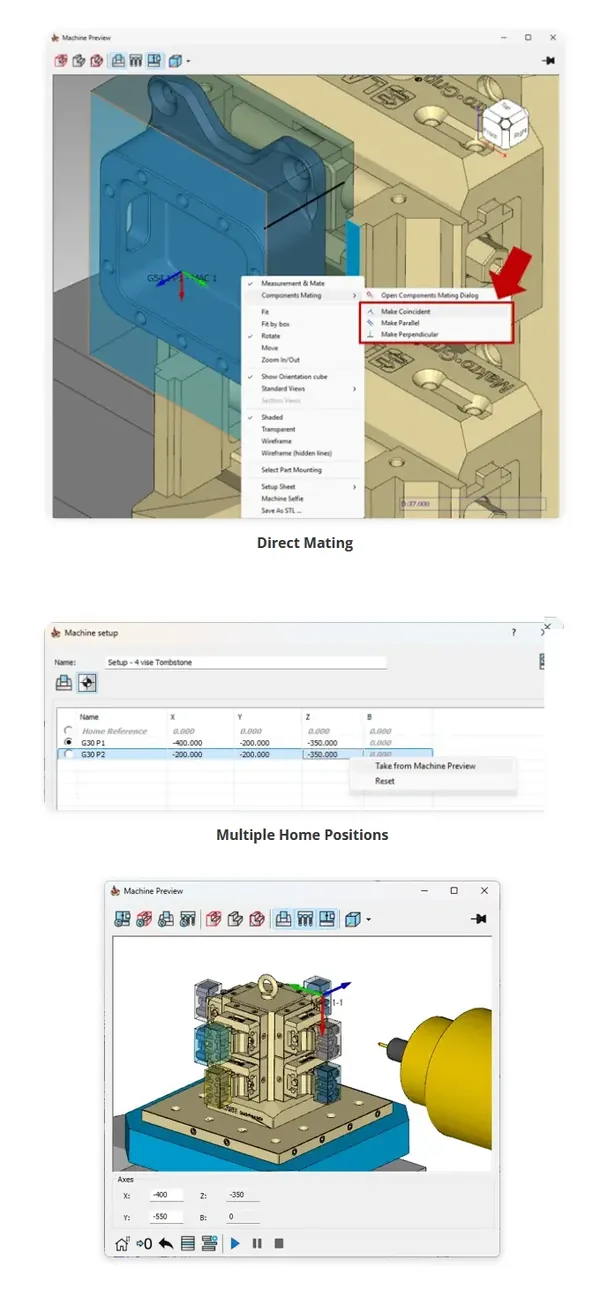
Machine Setup gains more direct control through Direct Mating in Machine Preview, multiple Part Mounting Point selection, copy and paste commands for mounting point data, support for multiple home references and the ability to suppress unused mounting points while still retaining fixtures for collision checking.
Performance has also improved through point reduction for Updated Stock calculation, compressed simulation files that can reduce File Sizes by 75-80%, faster pocket calculation for geometry with thousands of islands, and faster G-code generation and simulation preparation. Wire EDM benefits from faster WDB workflows, improved facet tolerance handling, better validation for empty toolpaths, deeper insertion point placement in predrilled holes and improved tangent approach offset handling.
MultiAxis Machining Improvements
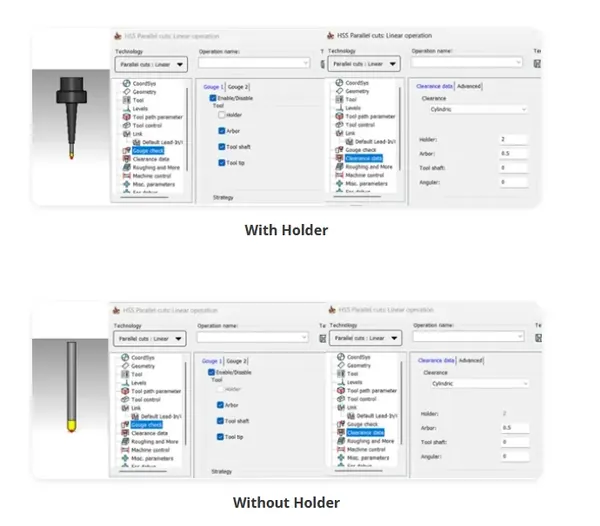
SolidCAM 2026 also includes useful improvements for MultiAxis machining, particularly around clearer setup, safer toolpath creation, and better surface quality. The Gouge Check and Clearance interfaces in 3-axis and 5-axis jobs now display only the tool elements that are actually used in the toolpath calculation, helping remove irrelevant data and making the setup easier to understand.
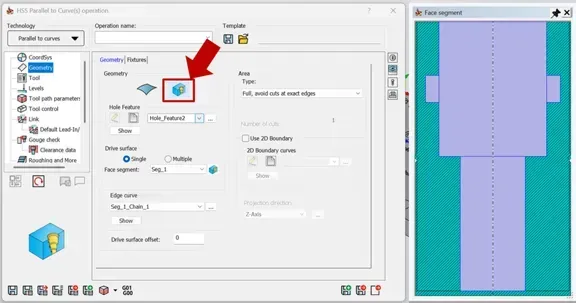
Pro 3D HSM also gains fixture support for Pencil and Horizontal strategies, allowing fixture surfaces or models to be recognised during calculation to help prevent collisions. Constant Stepover Machining has been improved with variable stepover control for both steep and shallow areas, helping optimise machining efficiency while improving surface finish. HSS also benefits from Hole Feature Geometry support, allowing toolpaths for conical, chamfer and radius hole features to be created using HSS Parallel to Curves, making it quicker to generate accurate 3D toolpaths from recognised hole geometry.
Why This Matters
SolidCAM 2026 is not just a collection of individual feature updates. It is a release built around improving real programming experience: fewer manual steps, faster calculation and simulation, better project handling, more flexible setup control, and stronger support for complex production environments. Whether you are managing large 3D toolpaths, running multi-vise production, validating complex machine motion, or improving turning reliability, SolidCAM 2026 helps reduce waiting time, improve confidence, and make better use of machine capacity.
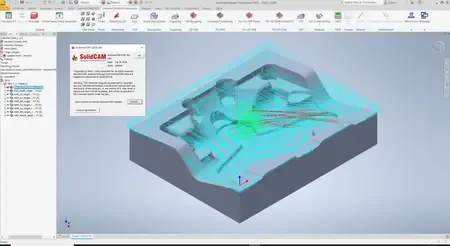
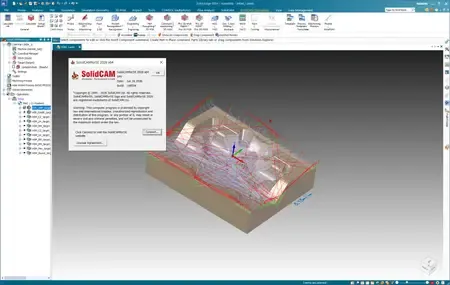
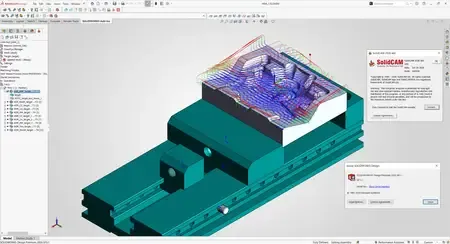
SolidCAM is the leading Integrated CAM software which runs directly inside in SOLIDWORKS, Autodesk Inventor and Solid Edge, with seamless integration and full tool path associativity. SolidCAM supports all types of CNC machines, including Swiss-Type machines, and is the only program with patented iMachining technology that allows for the highest speed and efficiency of milling programs, and also supports all Milling and Turning functionality, with powerful support for advanced Mill-Turn machines, including Swiss-Type.
Michael Vinetsky - New Features in SolidCAM 2026
SolidCAM, a global leader in innovative CAM software for CNC machining and distribution of related digital manufacturing solutions, has more than 20,000 CNC manufacturing customers worldwide
Сopyright holder \ Distributor:SolidCAM
Product Name:SolidCAM Products *
Version:2026 SP0
Supported Architectures:x64
Website Home Page :
www.solidcam.com
Languages Supported:multilanguage
System Requirements:Windows **
Software Prerequisites:Any pre-installed SolidWorks 2018-2026 \ Solid Edge 2020-2026 \ Inventor 2018-2026
Size in archive:18.2 Gb
Languages Supported: 中文, Čeština, Dansk, Nederlands, English, Français, Deutsch, עברית,
Magyar, Italiano, 日本語, 한국어, Polski, Português, Русский, Español, Türkçe
Included:
SolidCAM.2026.SP0.for.Solid.Edge.Win64-SSQ
SolidCAM.2026.SP0.for.SolidWorks.Win64-SSQ
InventorCAM.2026.SP0.Win64-SSQ
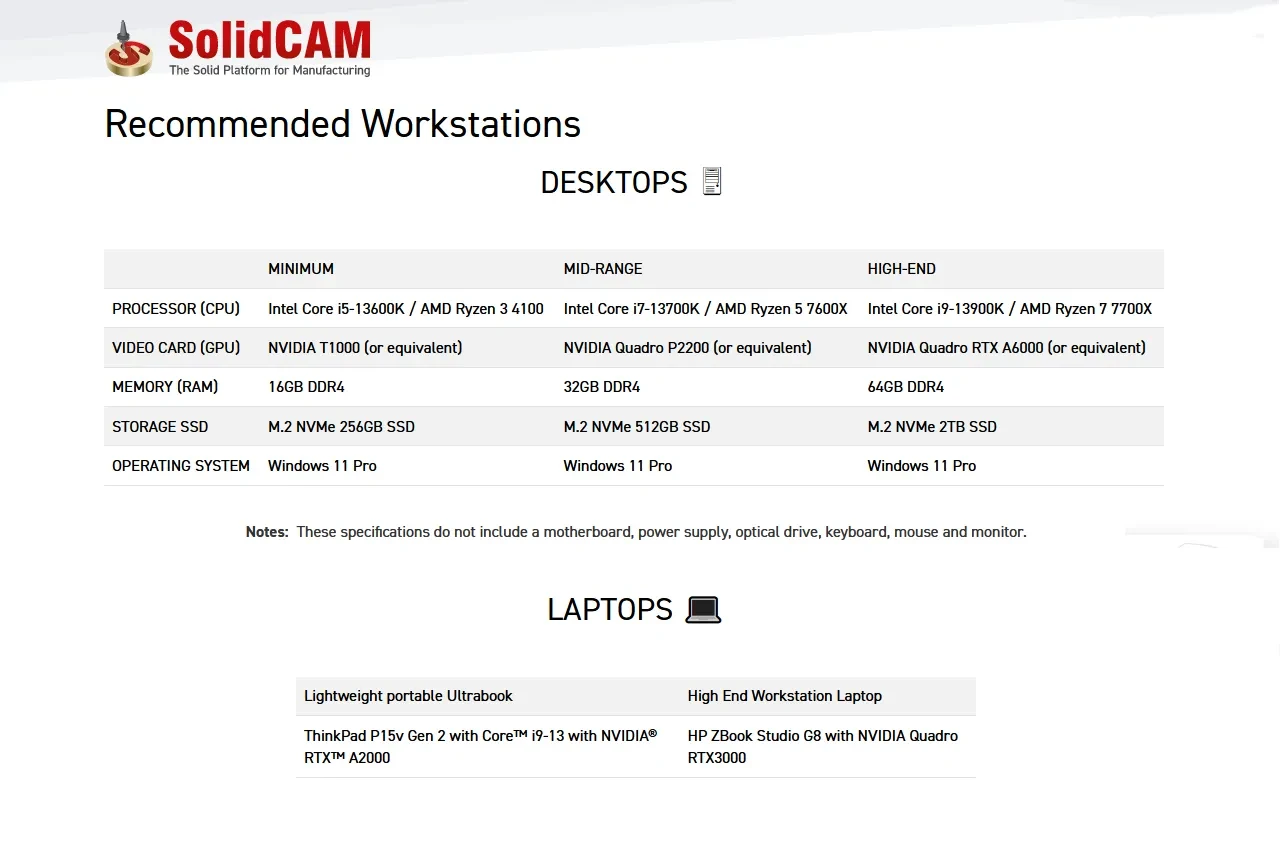
System Requirements:
Buy Premium From My Links To Get Resumable Support,Max Speed & Support Me
Rapidgator-->Click Link PeepLink Below Here Contains Rapidgator
SolidCAM_Products_2026_SP0_Win_x64_Multilanguage.html
https://peeplink.in/a79416b33c52
fv34x.SolidCAM_Products_2026_SP0.part1.rar.html
fv34x.SolidCAM_Products_2026_SP0.part2.rar.html
fv34x.SolidCAM_Products_2026_SP0.part3.rar.html
FreeDL
fv34x.SolidCAM_Products_2026_SP0.part1.rar.html
fv34x.SolidCAM_Products_2026_SP0.part2.rar.html
fv34x.SolidCAM_Products_2026_SP0.part3.rar.html
Links are Interchangeable - No Password - Single Extraction
⚠️ Dead Link ?
You may submit a re-upload request using the search feature.
All requests are reviewed in accordance with our Content Policy.
Discovering free software download can be a game-changer for users looking to enhance their digital experience without breaking the bank. These platforms offer a vast array of software free download options, covering everything from productivity tools to entertainment applications. The beauty of these sites is not just the price (or lack thereof) but also the variety and accessibility they provide, ensuring that there's something for every type of user.
Comments (0)
Users of Guests are not allowed to comment this publication.