
| view 👀:41 |
🙍 oneddl |
redaktor: Baturi | Rating👍:
ESRI ArcGis Pro 3.7 Build 1901 Win x64 English
ESRI ArcGis Pro 3.7 | 20.0 Gb
Esri, the global leader in spatial analytics technology, has released ArcGIS Pro 3.7 is desktop geographic information system (GIS) software for advanced mapping, analytics, and data management.
This release introduces new capabilities that reduce the need to duplicate maps, provide earlier insight into potential performance issues, and speed up many common workflows. With new tools to automatically extract features from scanned maps, the ability to control layer visibility by map frame in layouts, and much more, the improvements support more efficient, predictable work in ArcGIS Pro.
Control Layer Visibility by Map Frame
Say goodbye to duplicating a map each time a different set of layers needs to be displayed. In a layout with multiple map frames that point to the same map, you can now turn layers on and off by map frame without impacting the other ones. This makes it much easier to create, for example, comparison layouts, map books, or reports where one frame shows regional context and another highlights specific details, all without duplicating content.
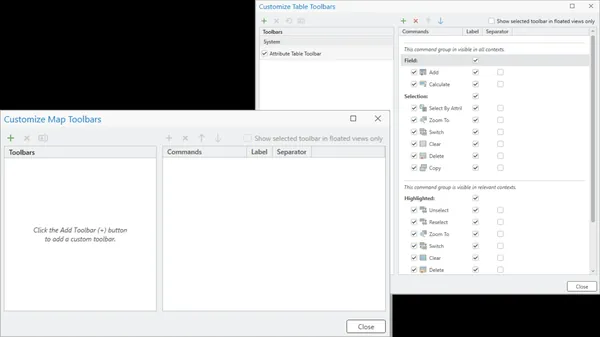
Custom Toolbars
Customizable toolbars enable you to cut down on tab switching and extra clicks. With ArcGIS Pro 3.7, you can tailor your toolbars to include the tools and actions you use most frequently. This is especially helpful when views are undocked from the main application and dragged to another monitor.
Analyze Map Performance
Get a clear picture of how your map content, like symbology or data, may be causing performance issues so you can resolve them early. ArcGIS Pro 3.7 introduces the Analyze Map functionality, which surfaces many potential performance issues as well as suggested fixes. There are three categories of potential issues you may see, in order of priority: Error (must be fixed), Warning (should be fixed), and Message (optional to fix but will improve performance).
Extract Lines and Polygons from Scanned Images
Reduce the amount of manual digitization needed when working with scanned map images. ArcGIS Pro 3.7 introduces the Extract Scanned Lines and Extract Scanned Polygons tools that automatically generate features from scanned map images. Extract lines for things like elevation contours, rivers, or soil boundaries, and extract polygons for things like building footprints or land use areas.
Explore More New Features
-New Documentation Experience:Leverage a new documentation experience for both online and offline help. Online help has moved from pro.arcgis.com to doc.esri.com and global performance has been significantly improved. Offline help is now accessed through ArcGIS Documentation Center using a unified documentation experience. Read this blog to learn more.
-Telecom Domain Networks:Address the scale and complexity of real-world telecom networks with the new telecom domain network configuration for ArcGIS Utility Network.
-Embeddings Based Analysis:Transform imagery, geographic features, and text into AI-generated vector representations to more easily find patterns and similarities with the new Embeddings Based Analysis GeoAI toolset.
-File Knowledge Graph:Create and manage a file knowledge graph in ArcGIS Pro in a local folder, without needing ArcGIS Enterprise. By creating this data model that represents real world systems, you can analyze relationships between spatial and nonspatial data to uncover patterns, trends, and insights.
What's Improved
-Distribute System Favorites:Your commonly used items like styles, folders, databases, server connections, and more are now organized under My Favorites. This release gives administrators the ability to distribute system favorites, which provide every team member consistent access to items established by your organization and appear alongside personal favorites.
-Select Features Using Geometry:Choose to select features based on the underlying geometry rather than symbology. This is especially helpful when precision matters as it improves accuracy when working with things like dashed lines, offsets, or complex symbols.
-Smarter Search for Symbols:Make sure you have semantic search enabled to leverage the new ability to search for symbols using natural language and conceptual terms. This makes it much easier to find an appropriate symbol without knowing its exact name. For example, search for symbols by typing what you're looking for like 'emergency' or 'medical' and get relevant symbols even if they use different terminology.
-Duplicate and Sort Definition Queries:Duplicate and sort your definition queries to more easily manage multiple filters with similar components.
-Document Your Geoprocessing History:Previously run tools are stored and available to review in geoprocessing history. Help your future self and teammates by adding descriptive notes to these entries to better document what was run and why.
-Pause Drawing in Layouts:Keep layout work running smoothly with the Pause Drawing button that now fully pauses all dynamic layout elements. This allows you to continue making edits without waiting for the layout to redraw each time.
-Clone Python Environments:Easily clone Python environments on disconnected machines. This means faster and more reliable environment creation in secure or offline environments, making it easier to test changes, troubleshoot issues, or share consistent Python setups across teams.
-Modify the Google Photorealistic 3D Basemap:Get the most out of the Google Photorealistic 3D basemap with the ability to replace portions of the mesh and insert your own more detailed data. This enables more flexible 3D visualization and analysis without recreating entire surfaces.
What's Faster
- ArcGIS Pro map files (.mapx) and layout files (.pagx) now have increased drawing speed and responsiveness, meaning they can be imported significantly faster.
- LAZ file performance was improved with the ability to generate statistics and create a spatial index, and to decompress LAZ files in parallel.
- Deleting features in a relationship class is now faster.
- Whether adding enterprise geodatabase data to a map or opening a map that contains such data, the workflow is now significantly faster.
Esri ArcGISis a geographic information system (GIS) software platform. GIS is used primarily to analyze spatial and locational data. The Esri ArcGIS platform offers both traditional desktop applications as well as cloud based tools.
ArcGIS Pro, the powerful single desktop GIS application, is a feature-packed software developed with enhancements and ideas from the ArcGIS Pro user community. ArcGIS Pro supports data visualization; advanced analysis; and authoritative data maintenance in 2D, 3D, and 4D. It supports data sharing across a suite of ArcGIS products such as ArcGIS Online and ArcGIS Enterprise, and enables users to work across the ArcGIS system through Web GIS. This powerful component of ArcGIS, Esri's geospatial platform, requires installation and runs on Windows only.
ArcGIS Pro: The World's Leading GIS Software
ArcGIS Pro, the powerful single desktop GIS application, is a feature-packed software developed with enhancements and ideas from the ArcGIS Pro user community. ArcGIS Pro supports data visualization; advanced analysis; and authoritative data maintenance in 2D, 3D, and 4D. It supports data sharing across a suite of ArcGIS products such as ArcGIS Online and ArcGIS Enterprise, and enables users to work across the ArcGIS system through Web GIS.
Esri, the global market leader in geographic information system (GIS) software, location intelligence, and mapping, helps customers unlock the full potential of data to improve operational and business results. Founded in 1969 in Redlands, California, USA, Esri software is deployed in hundreds of thousands of organizations globally, including Fortune 500 companies, government agencies, nonprofit institutions, and universities. Esri has regional offices, international distributors, and partners providing local support in over 100 countries on six continents. With its pioneering commitment to geospatial technology and analytics, Esri engineers the most innovative solutions that leverage a geographic approach to solving some of the world's most complex problems by placing them in the crucial context of location.
Сopyright holder \ Distributor:Esri
Product Name:ArcGIS Pro
Version:3.7 (1901)
Supported Architectures:x64
Website Home Page :www.esri.com
Languages Supported:english
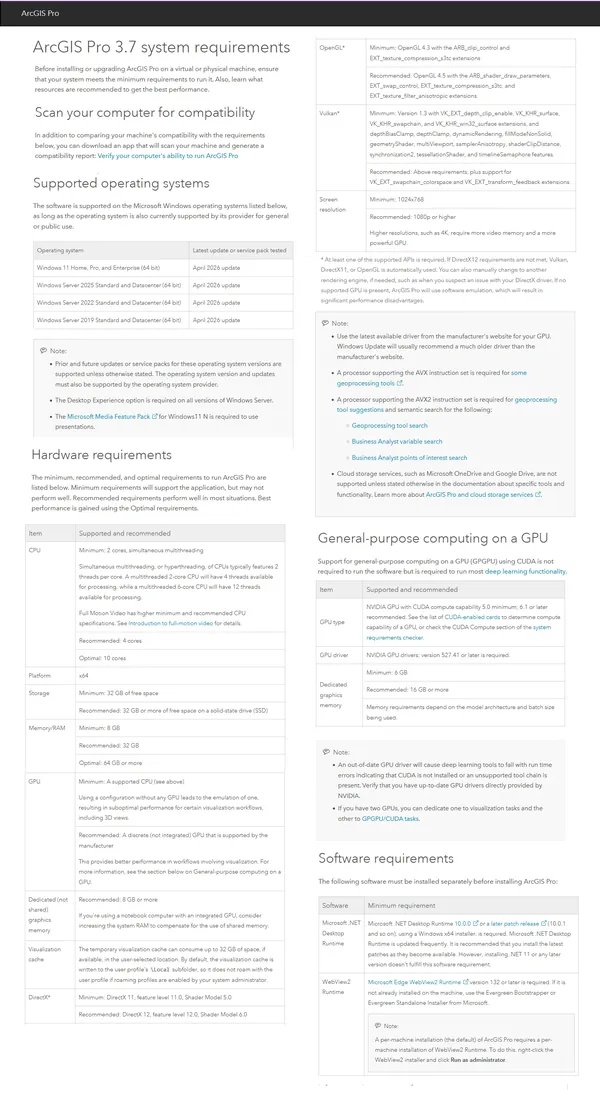
System Requirements:Windows **
Size in archive:20.0 Gb
ArcGISPro_37_199633.exe
ArcGISPro_37_Data_Interop_Ext_200059.exe
ArcGISPro_37_DJI_200061.exe
ArcGIS_Documentation_Center_20261_200284.exe
ArcGIS_Pro_37_Deep_Learning_Libraries_200060.zip
ArcGISProSDK_37_200135.exe
IBM_DataServerRuntimeClient_115_197911.exe
IBM_DataServerRuntimeClient_121_200269.exe
Microsoft_ODBC_Driver_18_SQL_Server_64bit_200271.exe
OracleDatabaseInstantClient_19c_200272.exe
OracleDatabaseInstantClient_23c_200274.exe
PostgreSQL_DBMS_for_Windows_177_200281.exe
PostgreSQL_DBMS_for_Windows_181_200282.exe
PostgreSQL_DBMS_for_Windows_1420_200278.exe
PostgreSQL_DBMS_for_Windows_1515_200279.exe
PostgreSQL_DBMS_for_Windows_1611_200280.exe
IBM_DataServerRuntimeClient_115_197912.tar.gz
IBM_DataServerRuntimeClient_121_200270.tar.gz
OracleDatabaseInstantClient_19c_200275.tar.gz
OracleDatabaseInstantClient_23c_200277.tar.gz
ArcGISPro_37_ST_Geometry_Oracle_200132.zip
ArcGISPro_37_ST_Geometry_PostgreSQL_200133.zip
ArcGISPro_37_ST_Geometry_SQLite_200134.zip
ArcGIS_Coordinate_Systems_Data_Windows_121_200093.exe
ArcGIS_Raster_Data_Windows_121_200095.exe
ArcGISPro_37_PerUser_Coordinate_Systems_Data_200092.exe
ArcGISProAviationAirportsProductData_37_200096.exe
ArcGISProAviationChartingProductData_37_200097.exe
ArcGISProBathymetryProductData_37_200098.exe
ArcGISProIndoorsProductData_37_200099.exe
ArcGISProMaritimeProductData_37_200100.exe
ArcGISProTopographicMappingProductData_37_200131.exe
Buy Premium From My Links To Get Resumable Support,Max Speed & Support Me
Rapidgator-->Click Link PeepLink Below Here Contains Rapidgator
ESRIArcGisPro37.html
https://peeplink.in/0488e6c7641e
DDownload
rvghe.ESRI-ArcGis-Pro-3-7.part1.rar
rvghe.ESRI-ArcGis-Pro-3-7.part2.rar
rvghe.ESRI-ArcGis-Pro-3-7.part3.rar
rvghe.ESRI-ArcGis-Pro-3-7.part4.rar
rvghe.ESRI-ArcGis-Pro-3-7.part5.rar
FreeDL
rvghe.ESRI-ArcGis-Pro-3-7.part1.rar
rvghe.ESRI-ArcGis-Pro-3-7.part2.rar
rvghe.ESRI-ArcGis-Pro-3-7.part3.rar
rvghe.ESRI-ArcGis-Pro-3-7.part4.rar
rvghe.ESRI-ArcGis-Pro-3-7.part5.rar
Links are Interchangeable - No Password - Single Extraction
⚠️ Dead Link ?
You may submit a re-upload request using the search feature.
All requests are reviewed in accordance with our Content Policy.
Discovering free software download can be a game-changer for users looking to enhance their digital experience without breaking the bank. These platforms offer a vast array of software free download options, covering everything from productivity tools to entertainment applications. The beauty of these sites is not just the price (or lack thereof) but also the variety and accessibility they provide, ensuring that there's something for every type of user.
Comments (0)
Users of Guests are not allowed to comment this publication.