
| view 👀:38 |
🙍 oneddl |
redaktor: Baturi | Rating👍:
Hexagon MSC Apex 2025.2 Win x64 English
Free Download Hexagon MSC Apex 2025.2 | 8.4 Gb
Hexagon is proud to announce the release of MSC Apex 2025.2 is a CAE specific direct modeling and meshing solution that streamlines CAD clean-up, simplification and meshing workflow while.
This release focuses on enhancements that ensure you can take advantage of the best new capabilities of MSC Nastran and offer improvements in the speed and performance of meshing.
Summary MSC Apex 2025.2 Release Highlights and Enhancements
Release Highlights:
- Improve analysis speeds with new linear gap capabilities for simulating compressive-only contact between parts.
- Use the new capability for merging nodes to increase performance for connected surfaces.
Product enhancements:
- Reduce license requirements with new multi-model support that lets you easily switch between models to compare and validate them in both pre-and post-processing.
- Enhanced beam handling is consistent with MSC Nastran and offers higher modeling accuracy for tapered elements and the flexibility to work with either beam properties or beam spans.
- Get higher performance when modeling ties between two surfaces. This enhancement means models no longer require a virtual edge, and no remeshing is required.
Use multiple models in MSC Apex
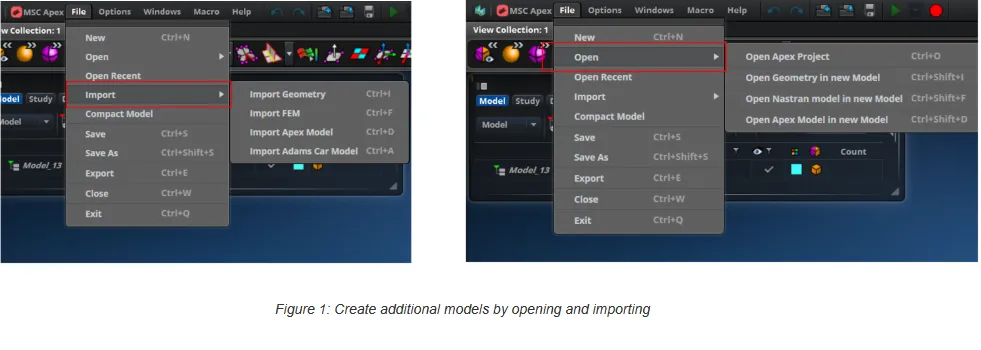
MSC Apex has made improvements to how nodes and elements are saved in models. This new multi-model feature allows users to import geometry, FEM, or MSC Apex databases into an existing model or open them as separate models without restarting the application.
Close
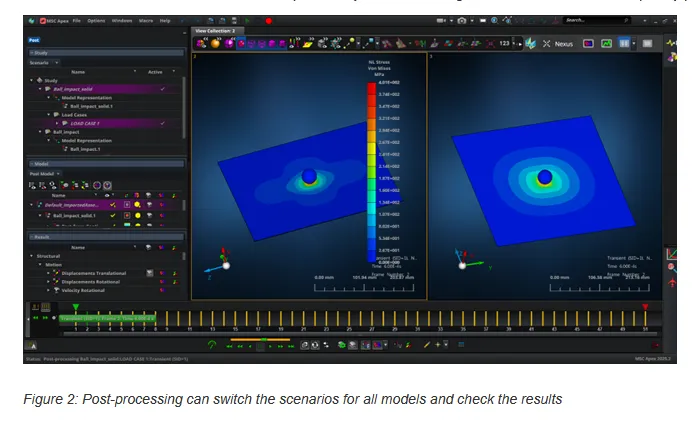
Seamlessly switch between active models to reduce downtime and improve workflow efficiency. Review, edit, and post-process scenarios across different models, which is particularly valuable for large assemblies and multi-disciplinary projects.
Close
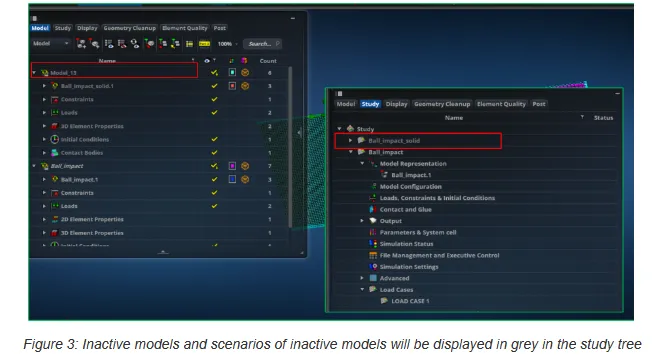
The system maintains full fidelity for each model, including geometry, mesh, and associated metadata to ensure no data is lost during transitions. Advanced memory management techniques handle multiple models without compromising performance, even for high-resolution meshes. The interface includes intuitive controls for activating, deactivating, and organizing models so navigation is straightforward. Multi-model support also integrates with scenario management for running analyses on different models concurrently or in sequence. This feature works seamlessly with scripting APIs for multi-model workflow automation for repetitive tasks.
Close
Enhanced mesh-dependent ties
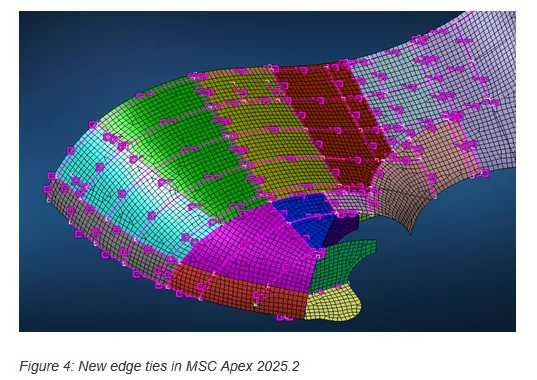
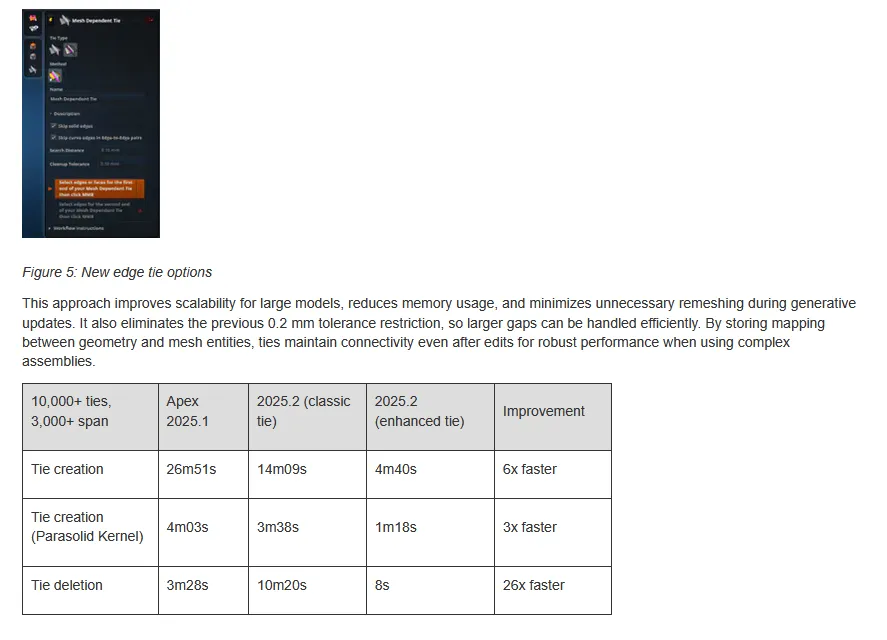
The new mesh-dependent tie introduces multiple tie types, including edge-to-edge, edge-to-element edge, and edge-to-node. Align geometry edges precisely with mesh edges or nodes to enforce congruent meshes across bodies without relying on virtual geometry layers. Enhanced tie types support orphan and associated meshes, facet bodies, and mixed element types for connections between solids, shells, and bars.
Close
Specify search distance and cleanup tolerance to control alignment, with ties acting like seeds by constraining node positions along edges.
Close
Node merge improvements
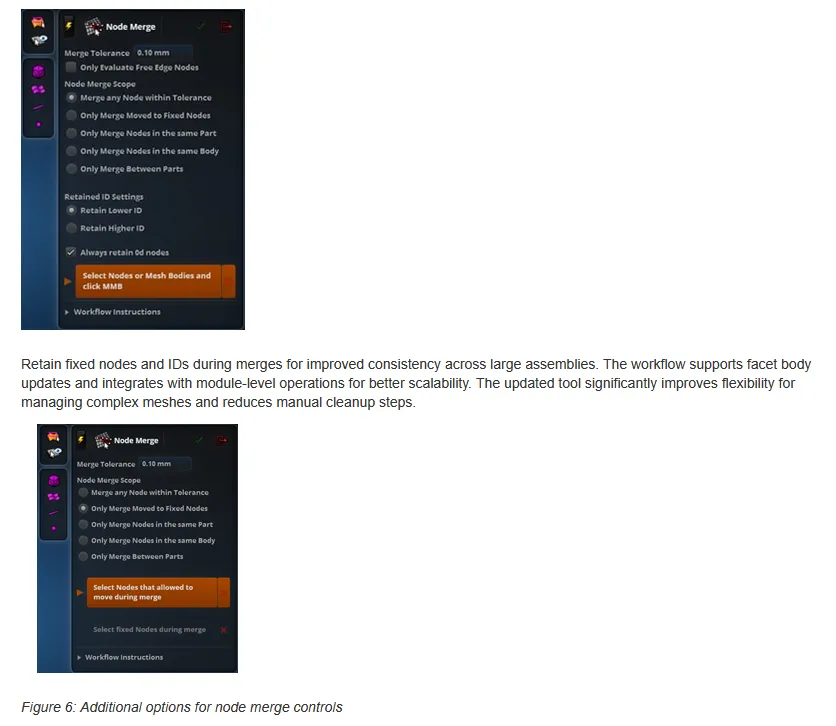
The Node Merge tool in MSC Apex 2025.2 now allows merging of any nodes within a specified tolerance, including orphan nodes and those associated with geometry, without requiring mesh disassociation or mesh-dependent ties. These improvements enable local edits and remeshing while maintaining FEM topology and connectivity.
Close
Additional meshing improvements
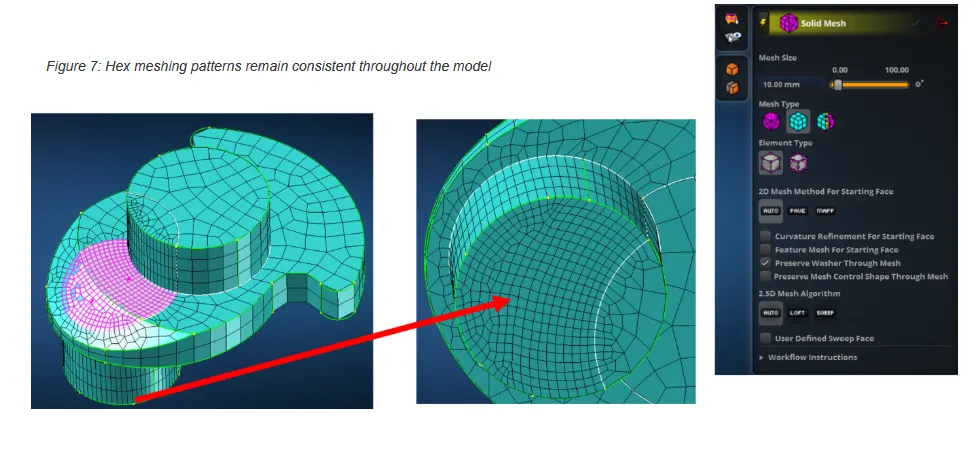
For hex meshing, there is a new option to preserve the mesh control shape throughout the mesh generation process. This ensures better quality and consistency for complex geometries, particularly when mesh control curves intersect boundary edges.
Close
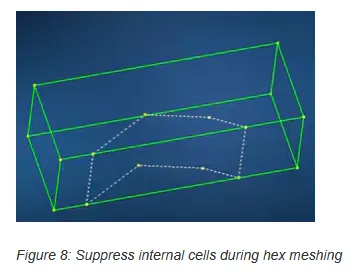
It is now possible to suppress internal edges of cells during hex meshing. This helps avoid unnecessary splits when creating hex meshes.
Close
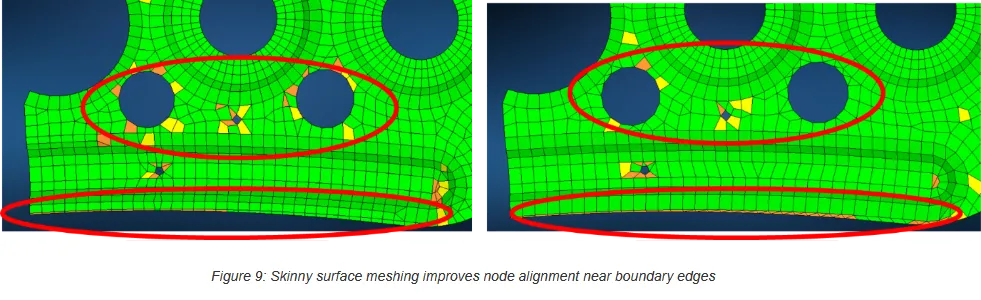
Skinny surface meshing has improved node alignment near close and boundary edges, resulting in fewer triangle elements and higher overall mesh quality.
Close
These updates collectively deliver more robust and predictable meshing behavior, reducing manual intervention and improving efficiency for large and intricate models.
1D element property catalog tool
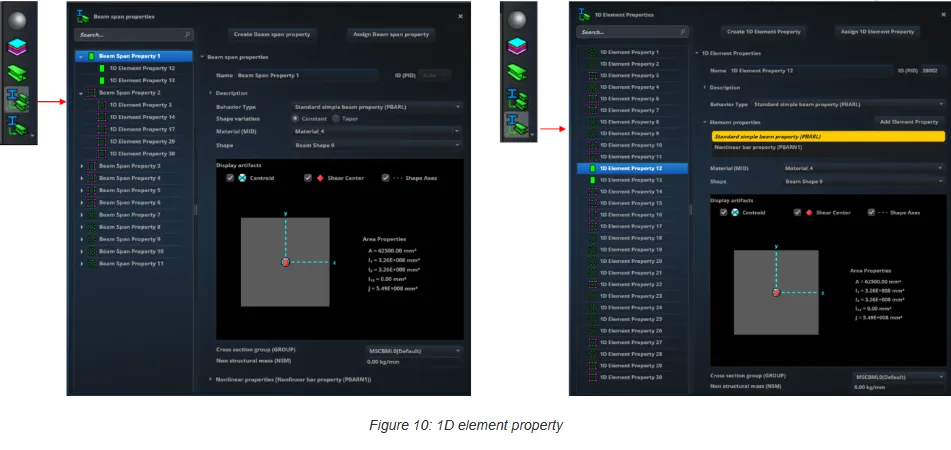
The 1D element property catalog tool streamlines workflows for traditional MSC Nastran beam modeling. This tool provides a centralized interface for creating, editing, and managing 1D properties such as PBAR, PBARL, PBEAM, and PBEAML. It also supports nonlinear beam properties like PBEMN1, PBARN1, and PRODN1. Organize properties efficiently, reducing duplication and improving consistency across large assemblies. The catalog approach mirrors existing patterns for materials and 3D element properties for intuitive navigation. By consolidating property definitions and offering direct assignment to elements, the tool enhances usability and accelerates the setup of complex beam models.
Close
Nonlinear beam properties
PBEMN1, PBARN1, and PRODN1 properties are used for accurate representation of nonlinear behaviors in beam elements. These properties are used to model complex structural responses under large deformations and nonlinear conditions without resorting to manual workarounds. By integrating these capabilities into the existing beam workflow, MSC Apex ensures consistency with Nastran input decks and simplifies the process of defining nonlinear characteristics for 1D elements. This enhancement expands the range of supported analyses and improves fidelity for applications requiring nonlinear beam modeling.
Hybrid approach for 1D element properties and beam spans
The beam span method is the ideal method for organizing beam elements across discontinuous segments, while the 1D property catalog supports traditional MSC Nastran workflows with centralized property management. Users can choose the most efficient approach for each project, whether using spans for mesh-only models or applying detailed property definitions for advanced analysis. By integrating both methods, the workflow improves usability, reduces duplication, and ensures consistency with Nastran input decks for easier setup of complex assemblies and nonlinear beam scenarios.
MSC Nastran 2025.2 integration
MSC Nastran 2025.2 added gap elements in linear analysis, and this feature is included in MSC Apex 2025.2. New global energy outputs for nonlinear analysis allow deeper insight into nonlinear static analyses. Additional options for controlling gaps in contact added to MSC Nastran are also supported by MSC Apex.
MSC Apex now supports SPARSESOLVER RESVEC, which offers faster residual vector computations for modal solutions. This is particularly beneficial for large, solid-element-dominated models.
Dynamic aeroelasticity in MSC Nastran is enabled in MSC Apex along with support for real coupled modes. New options for model validation in MSC Nastran (RBE3RFIX, RBE3TLVL, and RBE3THR) are now supported in MSC Apex. This improves the validation of rigid body elements and constraint handling.
Take advantage of the full power of MSC Nastran directly within Apex without sacrificing usability or workflow efficiency. By incorporating these advanced features, MSC Apex 2025.2 performs high-fidelity simulations with improved solver performance, expanded analysis coverage, and tighter integration between pre-processing, solution, and post-processing stages.
Scripting support for modules
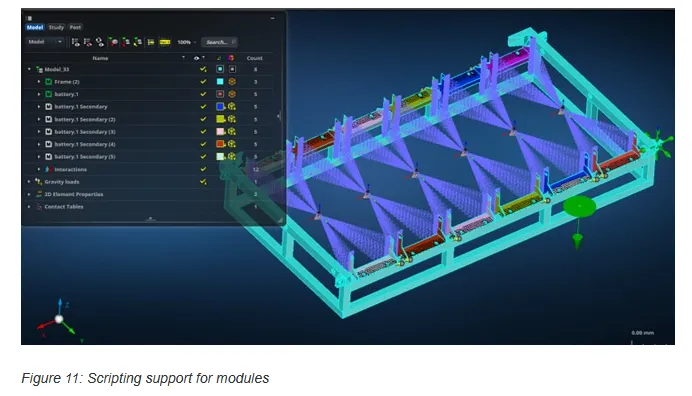
Create and manage modules using scripting, including operations such as transform actions and boundary connections. Define repeatable processes for complex assemblies to reduce setup time and improve consistency across projects. Integrate module operations into broader automation frameworks with the updated scripting API to simplify tasks like geometry preparation, mesh generation, and scenario setup.
Close
Scripting support for post-processing
MSC Apex 2025.2 introduces powerful scripting enhancements for post-processing to automate deform, fringe, and vector Descriptions, as well as create animations and hot spot visualizations. Integrate custom post-processing routines into broader automation frameworks with the updated scripting API to reduce repetitive tasks and review analyses quickly.
Usability and performance
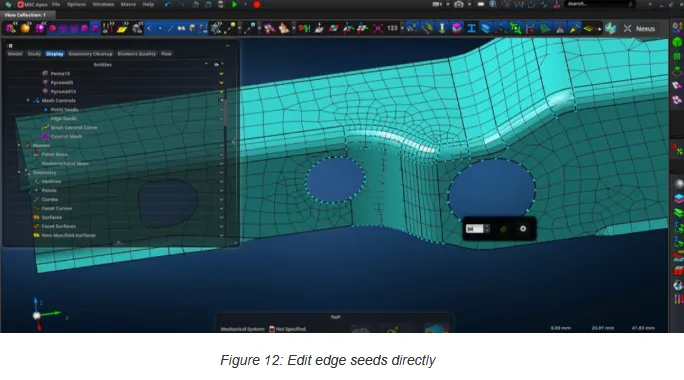
Edit edge seeds directly within the viewport without needing to navigate through multiple dialogs or menus. This enhancement provides a more intuitive and interactive experience for mesh refinement, allowing users to adjust seed values visually and immediately see an updated mesh distribution.
Close
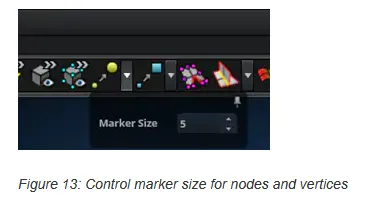
Edit the size of nodes and vertices, making these entities easier to see in the model.
MSC Apex, a finite element software that is very easy to learn and use, has an extremely useful workflow. Fast modeling capability gives the opportunity to make solutions on a phased and assembly basis and examine the results. With the integrated Nastran solver in MSC Apex, it can be checked whether the parts and sub-assemblies are ready to be analyzed gradually, even before the whole model has been prepared. MSC Apex works with CAE-oriented Direct Modeling and Meshing technique. You can easily make your geometry ready for simulation, create an element mesh, and then automatically adapt the element mesh to the new geometry by making changes on the geometry.
MSC Apex: From Complex to Click! Mastering New Nastran Scenarios with Python Automation
Struggling with the transition to the new Nastran scenarios in MSC Apex? You're not alone! While more powerful, the new workflow introduced in version 2024.1 can feel complex compared to the intuitive "Legacy" setup. In this session, Stefan Tynelius, a 20-year veteran at Hexagon and MSC Software, guides us through this "hot topic." He explains the pros and cons of both the legacy and new scenarios and unveils a game-changing feature in Apex 2025.1: the "User" scenario option.
Hexagon is a global leader in sensor, software and autonomous solutions. We are putting data to work to boost efficiency, productivity, and quality across industrial, manufacturing, infrastructure, safety, and mobility applications. Our technologies are shaping urban and production ecosystems to become increasingly connected and autonomous - ensuring a scalable, sustainable future.MSC Software, part of Hexagon's Manufacturing Intelligence division, is one of the ten original software companies and a global leader in helping product manufacturers to advance their engineering methods with simulation software and services.
Owner:Hexagon AB
Product Name:MSC Apex
Version:2025.2
Supported Architectures:x64
Website Home Page :
https://hexagon.com/
Languages Supported:english
System Requirements:Windows *
Size:8.4 Gb

Buy Premium From My Links To Get Resumable Support,Max Speed & Support Me
Rapidgator-->Click Link PeepLink Below Here Contains Rapidgator
HexagonMSCApex20252.html
DDownload
pgm13.Hexagon-MSC-Apex-2025-2.part1.rar
pgm13.Hexagon-MSC-Apex-2025-2.part2.rar
pgm13.Hexagon-MSC-Apex-2025-2.part3.rar
FreeDL
pgm13.Hexagon-MSC-Apex-2025-2.part1.rar.html
pgm13.Hexagon-MSC-Apex-2025-2.part2.rar.html
pgm13.Hexagon-MSC-Apex-2025-2.part3.rar.html
Links are Interchangeable - No Password - Single Extraction
⚠️ Dead Link ?
You may submit a re-upload request using the search feature.
All requests are reviewed in accordance with our Content Policy.
Discovering free software download can be a game-changer for users looking to enhance their digital experience without breaking the bank. These platforms offer a vast array of software free download options, covering everything from productivity tools to entertainment applications. The beauty of these sites is not just the price (or lack thereof) but also the variety and accessibility they provide, ensuring that there's something for every type of user.
Comments (0)
Users of Guests are not allowed to comment this publication.