
| view 👀:47 |
🙍 oneddl |
redaktor: Baturi | Rating👍:
LaunchControl 1.52.3 macOS
LaunchControl 1.52.3 macOS | 28.8 Mb
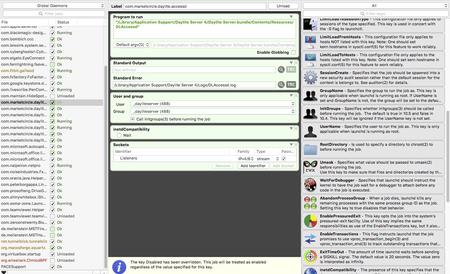
LaunchControl is a fully-featured launchd GUI allowing you to manage and debug system and user services on your Mac. All documented features of launchd(8) are supported. It reports potential problems even before a job is started and makes sure you always create valid configurations.
With LaunchControl you see all services and their respective status at a glance. Invalid services are highlighted and a problem description is provided. You can enable or disable services with a single click. The same goes for loading, unloading and ad-hoc starting. A long list of jobs may be filtered by job name and/or various properties, helping you to find what you are looking for in an instant.
But LaunchControl is not just another .plist editor. It provides a dedicated interface for every single launchd configuration key. The interface is
adaptive. It displays only information that is relevant for the selected job. Don't waste time trying to figure out why a job does not behave as expected.
LaunchControl performs exhaustive analysis of your job and chances are that it will find the problem in an instant and tell you howto fix it. It provides most of the functionality of the launchctl command line utility, everything you need to create, edit, remove or debug launch services and even includes a log viewer, so you don't have to fire up Console.app and build custom queries.
Sometimes it is desirable to quickly load, unload, start or stop a job on demand without hunting it down in LaunchControl every time.
QuickLaunch is a small menu extra living in your menu bar. It contains a list of selected jobs and their respective status.
To add a job to this menu select it in LaunchControl and select Job>QuickLaunch from the menu. This menu item will be checked to indicate that the job has been
added. Clicking it again will remove the job from the QuickLaunch menu again. launchd currently supports some 36+ documented keys.
LaunchControl makes it easy to discover them. Every key in the palette panel is annotated, so you don't have to consult the man page. Search
them by category, name or description. Once found, drag an item from the palette section to the configuration section to add this key.
Sophisticated interface
With LaunchControl you see all services and their respective status at a glance. Invalid services are highlighted and a problem description is
provided. You can enable or disable services with a single click. The same goes for loading, unloading and ad-hoc starting. Long list of jobs
may be filtered. You find what you are looking for in an instant. But LaunchControl is not just another .plist editor. It provides a dedicated
interface for every single launchd(8) configuration key. The interface is adaptive. It displays only information that is relevant for the selected
job.
Absolute freedom
While the default editing mode in LaunchControl supports all documented features of launchd(8), you may sometimes need to use unofficial
features. Switch to 'Expert Mode' and you're set. Both modes are fully synchronized. Changes in one editor will instantly show up in the other
one.
Everything you need
LaunchControl provides everything you need to create, edit, remove or debug launch services. It even includes a log viewer, so you don't have
to fire up Console.app and build custom queries.
Discover what's possible
launchd(8) currently supports some 36+ documented keys. LaunchControl makes it easy to discover them. Every key in the palette panel is
annotated, so you don't have to consult the man page. Search them by category, name or description. Once found, drag an item from the
palette section to the configuration section to add this key.
System requirements:
LaunchControl supports all macOS versions from Mavericks (10.9)* to Monterey (12). It requires a 64bit Intel or Apple Silicon Mac. Both architectures are supported natively.
Note: Starting with macOS Big Sur the system volume is sealed and it is no longer possible for any process to modify its contents. This affects LaunchControl's ability to modify system agents and daemons.
Home Page - https://www.soma-zone.com/LaunchControl/
Buy Premium From My Links To Get Resumable Support,Max Speed & Support Me
.html

https://rapidgator.net/file/1280c90b017eda9d520fba93d67f62f9/8y6g2.LaunchControl.1.52.3.macOS.rar.html
⚠️ Dead Link ?
You may submit a re-upload request using the search feature.
All requests are reviewed in accordance with our Content Policy.
Discovering free software download can be a game-changer for users looking to enhance their digital experience without breaking the bank. These platforms offer a vast array of software free download options, covering everything from productivity tools to entertainment applications. The beauty of these sites is not just the price (or lack thereof) but also the variety and accessibility they provide, ensuring that there's something for every type of user.
Comments (0)
Users of Guests are not allowed to comment this publication.