
| view 👀:10 |
🙍 oneddl |
redaktor: Baturi | Rating👍:
Reportizer 6.6.1.405 Multilingual
Free Download Reportizer 6.6.1.405 Multilingual Fast Links | 24.8 Mb
Database Reporting Tool. Reportizer is a report generation tool. Use it to create reports based on information from database or files. With Reportizer, you can create professional reports in a couple of minutes!
Visual Report Designer
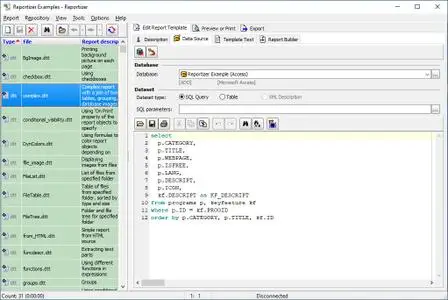
Reportizer reports can be edited in convenient and powerful visual report designer with property inspector, tool bars, Drag and Drop interface, Undo/Redo functionality, and much more. For advanced users, there is an option to modify reports in text mode.
Convenient SQL Editor
In most cases, database reports use SQL queries to get the data. And Reportizer gives you an easy to use SQL editor with syntax highlighting and code completion.
In the database query text, all SQL features of your database are supported. You can use SQL query parameters and macros which are applied dynamically at run time.
Powerful Report Generator
Report engine of Reportizer supports dynamically calculated expressions (formulas), displaying images (static or dynamically loaded from database or files), grouping records, multi-column reports, totals and subtotals etc.
Different Database Formats
Reportizer is a universal reporting tool as it works with all major database types like ODBC, Oracle, PostgreSQL, Interbase, Firebird, SQL Server, MySQL, SQLite, Access, Excel, Visual FoxPro, dBase, Paradox, CSV, HTML etc.
The report design is independent of database type. The database specific attributes of report are separated from the visual part of the report. For example, if you want to adapt your SQLite report for PostgreSQL database, you need to convert the database connection description and SQL code, but the visual part remains unchanged as long as you keep the field names the same.
File Reports
In addition to database reports, Reportizer can build and print file reports.
In file report, Reportizer uses Windows file system as a database, where folders are tables, and their sub-folders and files represent table records. The folder and file attributes can be interpreted as table fields.
Using such a feature, you can print list of files from specified folder(s) (with their icons, dates etc.), file contents and more.
Print Reports from Command Line
There is an ability to load and print reports from command line with a large set of options. It can be done either from Reportizer or from Reportizer Viewer (see below).
Export Reports to File
Reports can be exported to HTML, Excel (XLSX), text, PNG, JPEG, GIF, bitmap (BMP) formats.
There is an ability to save report in Reportizer internal format: static (prepared) report (STT). Static report contains an exact copy of the generated report and does not require the database connection to show the report, therefore it is useful for exchanging reports with colleagues, clients etc.
Operating System:Windows 7/8/10/11
Home Page-
https://www.reportizer.net/Buy Premium From My Links To Get Resumable Support,Max Speed & Support Me
Rapidgator
ufqot.Reportizer.6.6.1.405.Multilingual.rar.html
Links are Interchangeable - No Password - Single Extraction
⚠️ Dead Link ?
You may submit a re-upload request using the search feature.
All requests are reviewed in accordance with our Content Policy.
Discovering free software download can be a game-changer for users looking to enhance their digital experience without breaking the bank. These platforms offer a vast array of software free download options, covering everything from productivity tools to entertainment applications. The beauty of these sites is not just the price (or lack thereof) but also the variety and accessibility they provide, ensuring that there's something for every type of user.
Comments (0)
Users of Guests are not allowed to comment this publication.