
| view 👀:8 |
🙍 oneddl |
redaktor: Baturi | Rating👍:
BatchPatch 2025.10.24.15.52
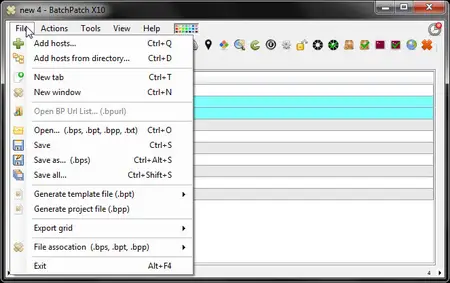
Free Download BatchPatch 2025.10.24.15.52 | 3.2 Mb
Stop dreading Microsoft's Patch Tuesday every month and finally take control of your patching process! Whether you're responsible for just 50 computers or more than 1000 computers, BatchPatch will save you a LOT of time. No more logging on to each computer to initiate the update installation. No more manually rebooting each machine and launching numerous ping windows to keep track of the reboot process. Finally, an app that lets you load a list of computers, and then kick off the Windows update installation and reboot process on all of them, simultaneously. You can now sit back, relax, and watch your computers update themselves.
Features
Initiate the download and / or installation of Windows updates on MANY remote computers simultaneously from a single console. Computers can be standalone, in a workgroup, or members of a domain. Check out this written tutorial or watch this video tutorial for details.
Choose to install all available updates or just install specific updates, by name. Additional filters are also available, allowing you to select updates by their classification groupings: Critical Updates, Security Updates, Definition Updates, Updates, Update Rollups, Service Packs, Feature Packs, Drivers, and Tools. Or mimic Microsoft Windows Update and choose to install only Important and/or Recommended updates.
Use your own managed WSUS server, or use BatchPatch in conjunction with Windows Update or Microsoft Update as an effective WSUS alternative.
Turn BatchPatch into a central distribution point for Windows Updates using the optional 'Cached Mode.'
Apply Windows Updates security updates to computers that do NOT have internet access (offline Windows Update) using 'Offline Mode.'
Retrieve Windows Update history information from all of your computers into a consolidated report.
Deploy software remotely to an entire network of computers with just a few of clicks.
Deploy standalone Microsoft or third-party patches such as Adobe or Java updates, as well as registry keys, scripts, and just about anything else to remote hosts.
Push install MSIs remotely to multiple computers (.msi .msp .msu .exe .reg .vbs .cmd and more). Take a look at the software deployment page for more information, tutorials, and videos.
BatchPatch offers a very convenient method for remote script execution, enabling you to easily and quickly retrieve information from your target computers, push configuration changes, apply custom settings, and do just about anything else you can think of.
Reboot or shutdown remote hosts and monitor status in real-time with integrated pinging.
No remote agent installation required! Simply launch BatchPatch and start patching.
Integrated job queues: You can create a set of actions to execute sequentially on remote hosts, which allows you to run scripts before and/or after reboot, or string together multiple patch and reboot cycles etc.
Advanced multi-host custom sequencing options to handle complex update and reboot tasks involving numerous computers with online/offline dependencies, all of which can be configured for single-click execution.
Execute your own custom scripts locally or remotely or add them to job queues for full automation flexibility.
Start and stop services, remotely.
Terminate remote processes.
Integrated task scheduler: Launch any task or job queue on a specific date and time.
List installed applications, retrieve uptime, and see who's logged on to target computers.
Get the OS version, CPU model/speed, or just about any inventory information from your target hosts through the use of custom queries.
Retrieve the last boot time from remote hosts (very handy when rebooting computers).
Retrieve the used/free disk space from remote hosts (make sure the remote hosts have enough space available for patch installations).
Retrieve the list of services that are set to "Automatic" but not currently running on the remote hosts (diagnose bootup issues).
Retrieve event logs from remote computers.
Launch remote desktop connections to hosts in the grid.
Wake on LAN.
System Requirements:
The BatchPatch console is supported to run on Windows 10, 11, 2012/2012R2, 2016, 2019, 2022. (NOTE: The BatchPatch console should generally be able to still run on older versions of Windows as long as they have .NET 4.6.2 installed, but we no longer officially support these older OS versions)
The following operating systems are supported as target systems: Windows 10, 11, 2012/2012R2, 2016, 2019, 2022. (NOTE: BatchPatch can generally still even patch Windows versions going all the way back to Windows 2000 SP3/SP4 and Windows XP targets too, but we no longer officially support these operating systems)
In order to use BatchPatch you must have the .NET Framework 4.6.2 installed on the computer you're running it from. Target hosts do NOT need to have .NET installed.
Home Page-
https://batchpatch.com/Buy Premium From My Links To Get Resumable Support,Max Speed & Support Me
Rapidgator
zirbo.BatchPatch.2025.10.24.15.52.rar.html
Fikper
Links are Interchangeable - No Password - Single Extraction
⚠️ Dead Link ?
You may submit a re-upload request using the search feature.
All requests are reviewed in accordance with our Content Policy.
Discovering free software download can be a game-changer for users looking to enhance their digital experience without breaking the bank. These platforms offer a vast array of software free download options, covering everything from productivity tools to entertainment applications. The beauty of these sites is not just the price (or lack thereof) but also the variety and accessibility they provide, ensuring that there's something for every type of user.
Comments (0)
Users of Guests are not allowed to comment this publication.