
| view 👀:87 |
🙍 oneddl |
redaktor: Baturi | Rating👍:
Imadio ShineOff Photoshop Plug-In 3.0.2
Imadio ShineOff Photoshop Plug-In 3.0.2 | 33.2 Mb
ShineOff Plug-In - Automatically Removes Shine. Your Digital Powder Puff! ShineOff is an Adobe® Photoshop® compatible Plug-In filter that automatically removes the shine from skin. The cold white light of the camera flash creates an unnatural shininess on skin. ShineOff automatically transforms faces and skin areas to a soft and natural looking appearance. This patent pending technology does not remove luster from the lips nor the sparkle from the teeth or eyes.
Technology - how does ShineOff work?
ShineOff is a Photoshop plug-in filter that automatically removes the shine from skin.
ShineOff is a patent pending technology that looks for the glare of the flash and other light sources on human skin. ShineOff will automatically transforms faces and skin areas to a soft and natural looking texture. This patent pending technology does not remove luster from the lips nor the sparkle from the teeth or eyes.
Tips and Techniques
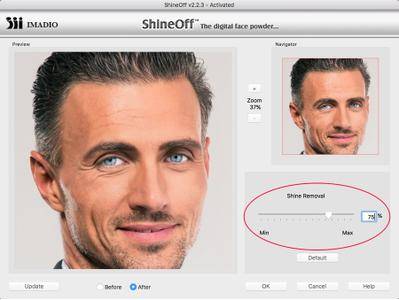
ShineOff has a slider to adjust the amount of the skin shine effect removed from your images. Simply move the slider to achieve the desired effect. You can choose between Less and More. A value can also be entered as a percentage in the range from 0 to 150. The default is 75. The previous ShineOff Version 1.x plug-in was equal to this default value. This parameter is saved with the filter and allows you to run a large number of images in a Batch operation.
ShineOff provides the maximum effect with only one application.
To localize the effect of ShineOff, use the following method to vary the amount of ShineOff by using the Photoshop History Brush applied selectively to the image. Example Steps:
1. Open Image
2. Select Filter > Imadio > ShineOff
3. The ShineOff user interface will appear
4. Adjust the slider to your liking
5. Select OK
6. Select 'History Brush Tool' from the Tool bar. Then select the box to the left of the ShineOff image under the History Tab (this sets source for History Brush to ShineOff). When properly selected, an icon of the 'History Brush' tool will appear in this box to the left of the ShineOff image.
How to Create a ShineOff Action in Photoshop
1) Open an image in Photoshop
2) Create a new action by clicking on the Create new action button at the bottom of the Actions palette. This will create and save the new action in the action folder you currently have selected (Default Actions.atn)
Using the Batch command (Photoshop)
The Batch command lets you play an action on a folder of files and subfolders. Similar to the action you created, you will be saving the processed files to a new location; you should create a new folder for the processed files before starting the batch.
System Requirements:
Applications:
- Adobe Photoshop 7.0 and higher versions Photoshop Elements 2 and higher versions PaintShop Pro 7 and higher versions
Operating Systems:
- Windows 10, 8, 7, Vista, XP, NT, 2000 (Mac OSX) and above
Image modes:
- RGB, 8 bits and 16 bits
Memory requirement:
- Minimum recommended is: 1GB
Home Page -
https://imadio.comBuy Premium From My Links To Get Resumable Support,Max Speed & Support Me

https://rapidgator.net/file/3889e6073b4def2aeb769edcd6303091/v5p8i.Imadio.ShineOff.Photoshop.PlugIn.3.0.2.rar.html
⚠️ Dead Link ?
You may submit a re-upload request using the search feature.
All requests are reviewed in accordance with our Content Policy.
Discovering free software download can be a game-changer for users looking to enhance their digital experience without breaking the bank. These platforms offer a vast array of software free download options, covering everything from productivity tools to entertainment applications. The beauty of these sites is not just the price (or lack thereof) but also the variety and accessibility they provide, ensuring that there's something for every type of user.
Comments (0)
Users of Guests are not allowed to comment this publication.