
| view 👀:162 |
🙍 oneddl |
redaktor: Baturi | Rating👍:
Advanced Download Manager v10.0
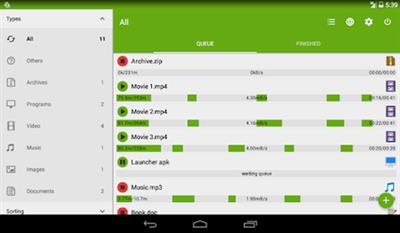
Advanced Download Manager v10.0 | Android | 5.95 MB
Pro Version
Advanced Download Manager is the best android downloader for you!
Powerful Downloader for Android:
- downloading from internet up to three files simultaneously;
- accelerated downloading by using multithreading (9 parts)
- interception of links from android browsers and clipboard;
- download files in background and resume after failure;
- loader for images, documents, archives and programs;
- downloading to SD-card for Lollipop and Marshmallow;
- smart algorithm for increased speed of downloading;
- downloading only through the internet on Wi-Fi;
- boost downloader for 2G, 3G and 4G networks;
- changing the maximum speed in real time;
- video downloader and music downloader;
- resuming of interrupted downloads;
- support files larger than 2 gigabyte;
- parallel download files in queue.
Advanced Settings:
- interface customization and themes;
- select the folder for downloaded files;
- different automatic actions after finishing;
- save different file types in different folders;
- create an empty file to accelerate downloading;
- autostop process if the battery charge level is low;
- import list of links from a text file on SD-card;
- autoresume after errors and break of connection;
- planning start of downloading at right time;
- turbo mode for speed up downloading;
- getting size of file and beautiful name;
- backup list of downloads and settings;
- profiles for each type of connection;
- automatic operation on schedule;
- support quick autoadd download.
Clean Interface:
- light material design;
- filter by types and status;
- left menu with quick options;
- context menu for easy management;
- sorting downloads by order, size and name;
- open completed files through favorite apps;
- information about downloading: speed, size, time;
- support pause, resume, restart for downloads;
- creation of advanced profiles for sites;
- fine-tuning for each download;
- widget on home screen.
Extended Notifications:
- icon with progress and speed in notification panel;
- transparent progress-bar on top of all windows;
- completion notification by sound and vibration.
Built-in ADM Browser:
- support of multiple tabs;
- advanced media downloader;
- list of history and bookmarks;
- easy sending file to downloader;
- download mp3 from popular archives;
- interception of mp4 video from tubes;
- easy downloader for all types of files;
- download accelerator for social networking;
- option "User-Agent" for forgery the browser.
Simple control for downloads:
- press on the download to start/stop the process;
- press on the completed download to open the file;
- long press on download to display the context menu.
Add URL links in ADM:
- press on link and from window "Complete action using" select ADM Editor;
- long press on a link to display the context menu, press "Share" or "Send" and from window "Share via" select ADM Editor;
- copy link, after program intercept it from clipboard and send in ADM Editor, or use "Add" button and paste the link.
Requirements: 5.0 and up
HomePage -
https://play.google.com/store/apps/details?id=com.dv.admBuy Premium From My Links To Get Resumable Support,Max Speed & Support Me

https://rapidgator.net/file/a6560571a1c1ae88a303c77d5fd784ad/n15bm.Advanced.Download.Manager.v10.0.rar
⚠️ Dead Link ?
You may submit a re-upload request using the search feature.
All requests are reviewed in accordance with our Content Policy.
Discovering free software download can be a game-changer for users looking to enhance their digital experience without breaking the bank. These platforms offer a vast array of software free download options, covering everything from productivity tools to entertainment applications. The beauty of these sites is not just the price (or lack thereof) but also the variety and accessibility they provide, ensuring that there's something for every type of user.
Comments (0)
Users of Guests are not allowed to comment this publication.