
| view 👀:4 |
🙍 oneddl |
redaktor: Baturi | Rating👍:
QueueExplorer Professional 5.0.86
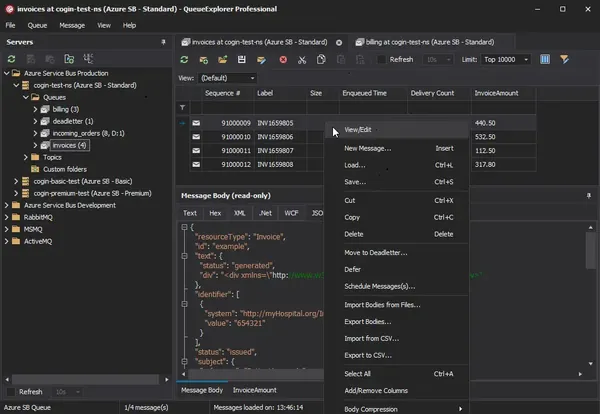
QueueExplorer Professional 5.0.86 | 35.4 Mb
QueueExplorer is a Windows-based messaging queue management tool designed for inspecting, analyzing, and controlling message-based systems. It provides a detailed view into queues and messages, allowing developers and system administrators to understand message flow, diagnose issues, and manage messaging infrastructure more effectively.
The application is used in environments where message brokers play a central role in communication between services. It supports multiple queuing technologies within a single interface, enabling users to work with different systems without switching tools or relying on separate management consoles.
QueueExplorer is built to offer deep visibility into message content and structure. Users can inspect message bodies, headers, and metadata, as well as edit or reprocess messages when necessary. This makes it useful for debugging distributed systems, validating message formats, and simulating message flows during development and testing.
In addition to inspection tools, the software provides administrative capabilities for maintaining queue health and system stability. It allows messages to be copied, moved, backed up, or removed, and supports performance testing by generating message loads. These features help teams manage both development and production environments more efficiently.
Key Features:
System Requirements
Windows 11, Windows 10, Windows 8, Windows 7
Windows Server 2022, Windows Server 2019, Windows Server 2016, Windows Server 2012, Windows Server 2008, Windows Server 2008 R2
.NET Framework 4.6.2 or higher
Home Page
Package Contents:
- Support for multiple messaging systems including MSMQ, Azure Service Bus, RabbitMQ, and ActiveMQ
- Detailed inspection of message content, headers, and metadata
- Multiple data viewers including JSON, XML, text, and hex formats
- Message editing, copying, moving, and deletion tools
- Ability to simulate and generate test message loads
- Queue monitoring with near real-time refresh capabilities
- Filtering and searching for fast message retrieval
- Backup, restore, and migration of queue data
- Support for analyzing dead-letter and failed messages
- Tools for comparing and synchronizing queue structures
System Requirements
Windows 11, Windows 10, Windows 8, Windows 7
Windows Server 2022, Windows Server 2019, Windows Server 2016, Windows Server 2012, Windows Server 2008, Windows Server 2008 R2
.NET Framework 4.6.2 or higher
Home Page
https://www.cogin.com/
Package Contents:
- Original installer
- Patched files
- Crack
- Keygen
- Activation
Buy Premium From My Links To Get Resumable Support,Max Speed & Support Me
Rapidgator
kp8h6.QueueExplorer.Professional.5.0.86.rar.html
kp8h6.QueueExplorer.Professional.5.0.86.rar.html
FreeDL
kp8h6.QueueExplorer.Professional.5.0.86.rar.html
Links are Interchangeable - No Password - Single Extraction
⚠️ Dead Link ?
You may submit a re-upload request using the search feature.
All requests are reviewed in accordance with our Content Policy.
Discovering free software download can be a game-changer for users looking to enhance their digital experience without breaking the bank. These platforms offer a vast array of software free download options, covering everything from productivity tools to entertainment applications. The beauty of these sites is not just the price (or lack thereof) but also the variety and accessibility they provide, ensuring that there's something for every type of user.
Comments (0)
Users of Guests are not allowed to comment this publication.