
| view 👀:18 |
🙍 oneddl |
redaktor: Baturi | Rating👍:
UUByte ISOKit 5.0 Multilingual (x64)
Free Download UUByte ISOKit 5.0 (x64) Multilingual Fast Links | 47.2 Mb
UUByte ISOKit (Formerly ISO Editor) The Ultimate Toolkit to Create Bootable USB and Download ISO on Mac & Windows.
[100% Success] Split install.wim and Create Bootable USB on Mac
UUByte ISO Editor is the best tool for creating Windows bootable USB on macOS. The best thing about this app is that it can split the large install.wim file (> 4GB) by default. This is the most challenging part for making Windows 10/11 installation USB on Mac. In addition, ISO Editor is fully compatible with Intel and Apple Silicon Mac, including M1 and M2 chip. Currently, this app is working perfectly on the latest macOS, including Sonoma,Ventura, Monterey, Big Sur, Catalina and more!
1- Click Burn ISO to USB
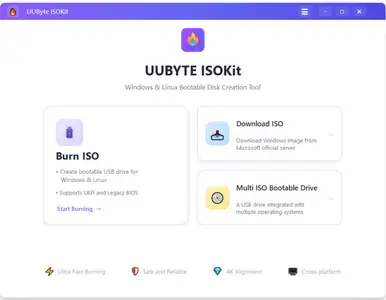
ISO burning is one of the most anticipated features of UUByte ISO Editor. It allows users directly burning ISO archive to an external media device, including USB flash drive, CD and DVD. The best part of this program is that it can make bootable disk from ISO image so you can use it to rescue the computer or fix system issues.
Safe and Fast Windows ISO Download
The new Download feature lets you safely download official Windows 11/10/8 ISO files directly from Microsoft servers in just a few clicks. No third-party sites, no complicated steps - fast downloads, verified sources, and a smooth, beginner-friendly experience built right into the app.
Put Multi-Boot OS On One USB
Support creating a multi-boot USB on a single USB drive, allowing you to store and boot Linux, Windows, and Unix systems together. No need for multiple USB sticks - simply add different OS images to one drive and choose which system to boot when starting your computer. It's a flexible, efficient solution for installers, technicians, and advanced users who work with multiple operating systems.ee!
Create Bootable Linux USB from Various Distros
UUByte ISO Editor now lets you create bootable Linux USB drives from multiple popular distributions with ease. Simply select your Linux ISO, choose the target USB drive, and the app handles the rest - fast, reliable, and beginner-friendly. It supports both UEFI and Legacy BIOS, making Linux installation or live boot straightforward across different PCs.
More Features:
Create Installation Disk
Make bootable disk from Linux and Windows 11/10/7 ISO file. Great for system rescue.
Support UEFI Boot
Secure UEFI boot is well supported as well as legacy boot. No need to worry about booting issue.
Fully Compatible with macOS
macOS updates frequently so does our ISO Editor app. Always support the latest macOS
Smart Engine
Build the ground with sophisticated AI engines, UUbyte is much faster and smarter than other ISO tools.
Modern UI
No one likes elderly user interface, right? We hire the smartest designer to craft the user interface from scratch.
Detailed User Tutorial
Don't know how to use the program? Or have problem during the operation? You can find all the details from our website.
Home Page -
https://www.uubyte.com/iso-editor.html
Buy Premium From My Links To Get Resumable Support,Max Speed & Support Me
Rapidgator
coqar.UUByte.ISOKit.5.0.x64.Multilingual.rar.html
DDownload
coqar.UUByte.ISOKit.5.0.x64.Multilingual.rar
FreeDL
coqar.UUByte.ISOKit.5.0.x64.Multilingual.rar.html
Links are Interchangeable - No Password - Single Extraction
⚠️ Dead Link ?
You may submit a re-upload request using the search feature.
All requests are reviewed in accordance with our Content Policy.
Discovering free software download can be a game-changer for users looking to enhance their digital experience without breaking the bank. These platforms offer a vast array of software free download options, covering everything from productivity tools to entertainment applications. The beauty of these sites is not just the price (or lack thereof) but also the variety and accessibility they provide, ensuring that there's something for every type of user.
Comments (0)
Users of Guests are not allowed to comment this publication.